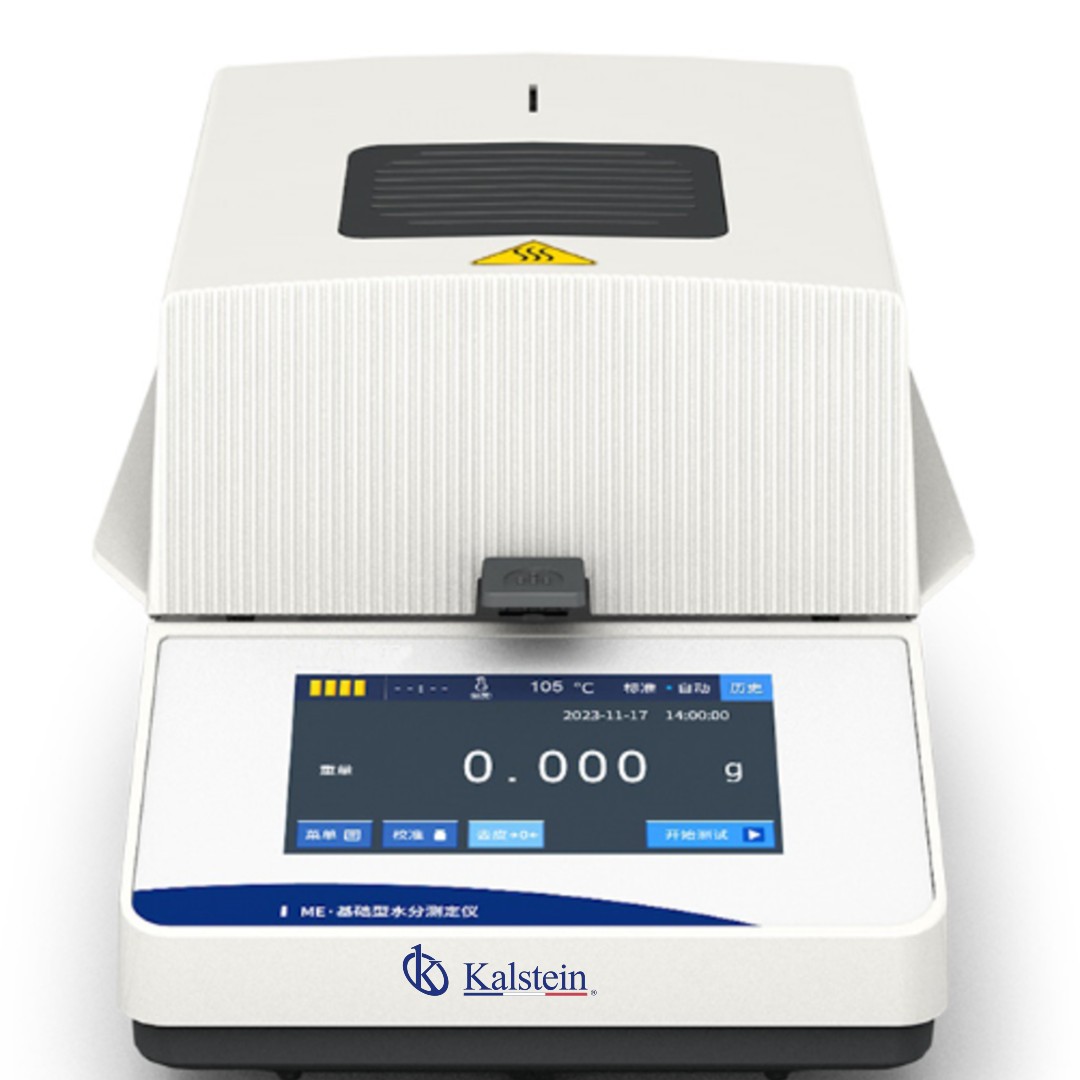
Installation and Commissioning Guide for the YR06696 Moisture Analyzer
The YR06696 Moisture Analyzer is a state-of-the-art instrument designed for laboratories and industries that require quick and reliable determination of moisture content in various substances. This guide will walk you through the essential steps for proper installation and commissioning of the YR06696, enabling you to utilize its advanced features effectively.
Overview of the YR06696 Moisture Analyzer
With advanced halogen lamp technology, the YR06696 ensures uniform drying and reproducible results in minutes. It caters to sectors such as food, pharmaceuticals, chemicals, and agriculture, highlighting its 5-inch touchscreen display that simplifies operation and allows real-time analysis curves to be visualized.
Technical Specifications of the YR06696
| Parameter | Features |
|---|---|
| Model | YR06696 |
| Maximum Capacity | 110 g |
| Weight Readability | 0.01 g |
| Weight Sensor | Load cell |
| Heat Source | Halogen lamp |
| Temperature Range | 40°C - 160°C (increments of 1°C) |
| Humidity Range | 90.00% - 10.00% |
| Humidity Readability | 0.1% |
| Display | 5-inch touch screen |
| Plate Size | 96 mm |
| Storage | 20 groups of memory |
| Analysis Curve | Real-time dynamic |
| Test Height | 30 mm |
| Power Supply | 220V 50Hz / 110V 60Hz |
| Instrument Dimensions | 33.6 x 21.4 x 16.6 cm |
| Package Size | 41.5 x 31.0 x 25.5 cm |
| Net Weight | 3.5 kg |
| Gross Weight | 4.0 kg |
Unboxing and Initial Setup
Before you begin using the YR06696, ensure that you have the following items:
- YR06696 Moisture Analyzer
- Power cord
- User manual
- Calibration weights
To begin, carefully unbox the analyzer and check for any visible damage. Ensure all items are present before proceeding to installation.
Physical Installation Steps
The installation process includes the following steps:
- Positioning: Place the YR06696 on a stable and flat surface to minimize vibration during operation.
- Leveling: Use a spirit level to ensure the analyzer is properly leveled. Adjust the feet if necessary.
- Power Connection: Plug the power cord into a suitable outlet, ensuring the voltage aligns with the device specifications (110V or 220V).
Power-Up Sequence and Initial Settings
Upon powering up the YR06696:
- Turn on the device using the power switch located at the back.
- The device will perform a self-diagnostic check. Wait for it to complete.
- Follow the on-screen prompts to set the language preferences and calibration parameters.
For the first run, it is crucial to calibrate the device. Use the provided calibration weights to ensure accuracy. Follow the calibration procedure outlined in the user manual.
Common Setup Mistakes and Troubleshooting
While setting up the YR06696, operators may encounter the following common mistakes:
- Improper leveling of the instrument, leading to inaccurate readings.
- Failing to calibrate before the first use, which can result in significant measurement errors.
- Connecting to an incompatible power source, risking damage to the device.
To troubleshoot these issues, refer to the symptoms and solutions table below:
| Symptom | Likely Cause | Solution |
|---|---|---|
| Device does not power on | No power supply | Check power connections and ensure outlet is functioning |
| Error Code E-03 | Calibration error | Recalibrate using appropriate weights |
| Inconsistent Readings | Improper sample distribution | Ensure uniform sample distribution on the plate |
Operating the YR06696: Best Practices
To achieve the best performance with the YR06696, consider the following best practices:
- Always ensure the sample is evenly distributed on the 96 mm plate for accurate results.
- Keep the PT-100-2 sensor clean to avoid erroneous temperature readings.
- Calibrate the analyzer regularly, especially before critical testing sessions.
Frequently Asked Questions
What is the maximum sample capacity of the YR06696?
The YR06696 can analyze samples of up to 110 grams.
Can the drying temperature be adjusted on the YR06696?
Yes, the drying temperature range is adjustable from 40°C to 160°C in 1°C increments.
How are test reports transferred from the YR06696?
The YR06696 features a historical test report function that allows users to review previous analyses directly on the screen or manage them based on the communication port settings.
What are the advantages of using the YR06696 in laboratory settings?
The YR06696 features a modern interface, dynamic real-time monitoring, and silent operation, all of which facilitate error reduction and enhance usability in laboratory environments.
What precautions should be taken during the installation of the YR06696?
Ensure that the device is installed in a vibration-free environment with appropriate voltage levels to avoid operational errors and potential damage.
How do I maintain the YR06696 for long-lasting performance?
Regular maintenance includes cleaning the sensor, calibrating the device as needed, and ensuring the area around the analyzer is free from obstructions and dust.
What sectors can benefit from using the YR06696?
Sectors such as veterinary clinics, food processing plants, quality control laboratories for plastics, and compounding pharmacies can effectively utilize the YR06696 for moisture analysis.
If you are looking for a fusion of innovation and quality, you have come to the right place. At Kalstein, we offer you the luxury of exploring our exclusive catalog of laboratory equipment. We manufacture every device to the highest standards of excellence. Our intuitive and seamless online purchasing channels are designed for your convenience, securing the most competitive prices. Hesitate no longer — we bring science to life, it is time to become part of our community.