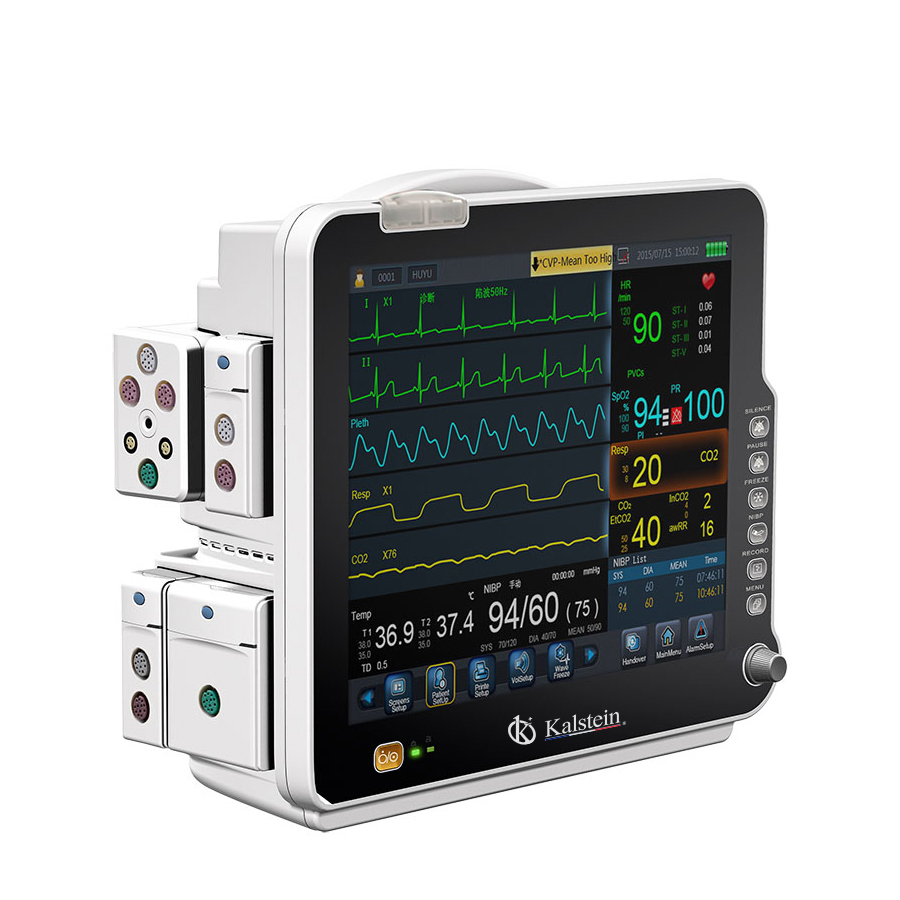
Installation and Commissioning Guide for the YR02177 Patient Monitor
The YR02177 Patient Monitor is a versatile device designed for use in Intensive Care Units (ICUs) and operating rooms. This guide provides a detailed overview of the installation and commissioning processes for the YR02177, ensuring a seamless startup and optimal performance.
Understanding the YR02177 Patient Monitor
The YR02177 features a 17-inch LCD display and offers modular parameters including ECG, SpO2, temperature, NIBP, respiration, and heart rate/pulse rate. This section will delve into the core functionalities and the significance of each parameter in clinical settings.
Unboxing and Initial Setup
Upon receiving the YR02177 Patient Monitor, it is essential to perform an initial inspection and unboxing checklist. Ensure that all components, including the main unit, accessories, and cables, are present and undamaged. Here’s a detailed checklist:
- Main monitor unit
- Power supply and cable
- Probes and sensors (ECG leads, SpO2 sensor, etc.)
- User manual and technical specifications
- Additional accessories (if applicable)
Installation Requirements
Proper installation of the YR02177 Patient Monitor requires consideration of environmental conditions and physical space requirements. This includes maintaining adequate ventilation, ensuring proper power supply, and meeting space clearance factors. Below is a site-prep checklist:
| Requirement | Specifications |
|---|---|
| Temperature Range | 10°C to 40°C |
| Humidity | 30% to 75% RH |
| Power Supply | AC 100-240V, 50/60Hz |
| Space Clearance | At least 0.5 meters from walls |
Power-Up Procedure and Calibration
To power up the YR02177, connect the power supply and switch on the main unit. The calibration process involves setting up the ECG, SpO2, and other monitoring parameters according to the manufacturer’s recommendations. Follow these steps for a successful calibration:
- Connect all required sensors and probes.
- Access the setup menu on the monitor.
- Select calibration settings for each parameter.
- Perform initial readings and compare with standard values.
- Adjust settings as necessary and save configurations.
Common Setup Mistakes and Troubleshooting
During the installation and commissioning process, operators may encounter common mistakes. Below is a table outlining some typical errors, their causes, and solutions:
| Mistake | Possible Cause | Solution |
|---|---|---|
| Monitor does not power on | Power supply is disconnected | Check power connections |
| Inaccurate ECG readings | Poor lead placement | Reposition leads according to guidelines |
| Alarm not sounding | Volume settings muted | Adjust volume settings in the menu |
Technical Specifications of the YR02177
| Model | YR02177 |
|---|---|
| Brand | Kalstein |
| Category | Patient Monitor |
| Weight | 8 kg |
| Dimensions | 57 x 39 x 53.5 cm |
Frequently Asked Questions
What parameters can the YR02177 monitor?
The YR02177 is capable of monitoring ECG, SpO2, temperature, NIBP, respiration, and heart rate/pulse rate, making it suitable for various clinical applications.
How do I calibrate the YR02177 Patient Monitor?
Calibration involves setting the appropriate parameters through the monitor's setup menu, ensuring accurate readings by comparing with standard values.
What should I do if the monitor displays an error code?
Consult the user manual for a list of error codes and their meanings. Follow the troubleshooting steps provided for each specific error.
Can the YR02177 be used for neonatal patients?
Yes, the YR02177 is designed to monitor vital signs in neonatal patients, as well as in pediatric and adult populations.
What is the warranty period for the YR02177 Patient Monitor?
The YR02177 typically comes with a warranty period specified in the user manual, covering manufacturer defects and performance issues.
How often should the YR02177 be serviced?
The YR02177 should undergo regular maintenance checks according to the service schedule outlined in the user manual to ensure optimal performance.
If you are looking for a fusion of innovation and quality, you have come to the right place. At Kalstein, we offer you the luxury of exploring our exclusive catalog of laboratory equipment. We manufacture every device to the highest standards of excellence. Our intuitive and seamless online purchasing channels are designed for your convenience, securing the most competitive prices. Hesitate no longer — we bring science to life, it is time to become part of our community.