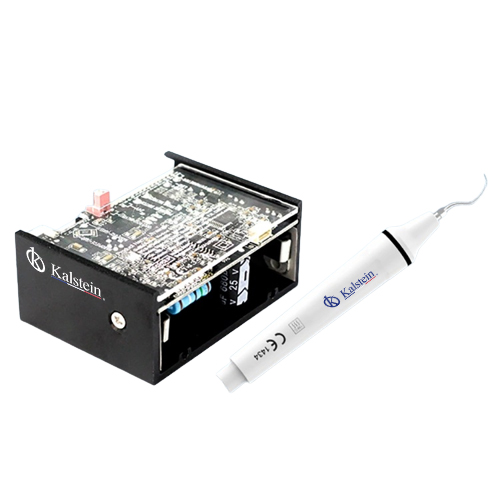
Troubleshooting the YR06012-OP4: Common Errors and Solutions by Symptoms
The YR06012-OP4 dental accessory is a vital tool in modern clinical practices. Its efficiency and operational ability can occasionally be hampered by errors that require troubleshooting. Understanding these error codes and symptoms is essential for optimal performance. This article delves into common troubleshooting methods by exploring various symptoms associated with the YR06012-OP4.
Technical Specifications of the YR06012-OP4
| Model | Description | Used for |
|---|---|---|
| YR06012-OP4 | Cavitron scaler with LED light | All our dental units |
Common Symptoms and Their Solutions
When operating the YR06012-OP4, users may encounter various symptoms that indicate potential issues. The following sections categorize these symptoms and provide possible causes and solutions.
Equipment Does Not Power On
One of the most concerning issues is when the YR06012-OP4 fails to power on. Possible causes include:
- Power Supply Issues: Check the power cord and outlet functionality.
- Internal Electrical Fault: Inspect for blown fuses or damaged internal components.
To resolve:
- Ensure the device is properly plugged in and check the outlet with another device.
- Contact technical support for assistance with internal components.
Error Code E-01
Error Code E-01 typically indicates a malfunction in the LED functionality. Causes might include:
- LED Failure: The LED bulb may be burnt out.
- Connection Issues: Loose wiring connections to the LED module.
To fix this error:
- Replace the LED bulb if necessary.
- Secure any loose connections within the unit.
Inconsistent Performance
Inconsistencies in performance can be frustrating. Possible causes include:
- Clogged Mechanism: Debris may be obstructing operational parts.
- Calibration Errors: The unit may need recalibration.
To address this:
- Perform a thorough cleaning of the unit.
- Calibrate the unit according to the manufacturer’s guidelines.
Overheating Issues
Overheating can cause the YR06012-OP4 to shut down unexpectedly. Causes might include:
- Blocked Ventilation: Ensure that ventilation openings are not blocked.
- Excessive Usage: Prolonged use without breaks may overheat the device.
Solutions involve:
- Regularly check and clean ventilation areas.
- Implement use breaks to allow cooling.
Symptom-Cause-Solution Matrix
| Symptom | Possible Cause | Solution |
|---|---|---|
| Equipment Does Not Power On | Power supply issues or internal fault | Check outlet; contact support |
| Error Code E-01 | LED failure or connection issues | Replace LED; secure connections |
| Inconsistent Performance | Clogged mechanism or calibration errors | Clean the unit; recalibrate |
| Overheating Issues | Blocked ventilation or excessive usage | Clean vents; implement breaks |
Frequently Asked Questions
What are the common error codes for the YR06012-OP4?
The common error codes include E-01 for LED malfunctions and E-02 for power supply issues. Each error code corresponds to specific troubleshooting steps that can resolve the issue.
How often should the YR06012-OP4 be serviced?
It is recommended to service the YR06012-OP4 at least once a year to ensure optimal performance and longevity of the device.
Can I perform troubleshooting on my own?
Many basic troubleshooting steps can be performed by the user, such as checking connections and cleaning the unit. However, complex issues should be handled by a qualified technician.
Is there a warranty for the YR06012-OP4?
Yes, the YR06012-OP4 typically comes with a one-year warranty covering manufacturing defects. Be sure to consult the warranty guidelines for specific details.
How should I maintain the YR06012-OP4?
Regular maintenance includes cleaning the unit, checking for blockages, and ensuring all components are functioning properly. Following the manufacturer's maintenance schedule is crucial.
What should I do if I encounter persistent errors?
If persistent errors occur, it is advisable to contact technical support for detailed diagnostics and potential repairs.
How can I request a quote for additional accessories for the YR06012-OP4?
You can request a quote for additional accessories through our designated sales channels, ensuring you get the best options for your needs.
If you are looking for a fusion of innovation and quality, you have come to the right place. At Kalstein, we offer you the luxury of exploring our exclusive catalog of laboratory equipment. We manufacture every device to the highest standards of excellence. Our intuitive and seamless online purchasing channels are designed for your convenience, securing the most competitive prices. Hesitate no longer — we bring science to life, it is time to become part of our community.