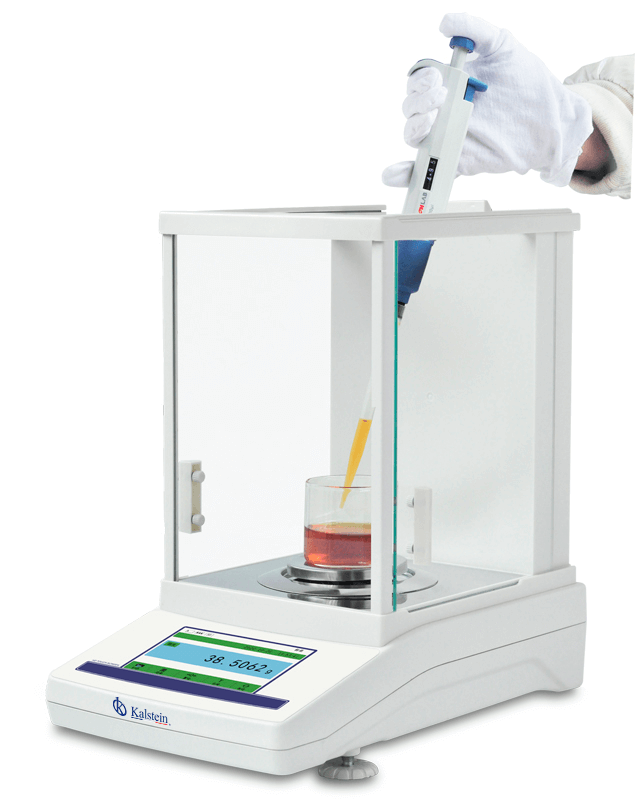
Troubleshooting Common Errors on the YR05575 Analytical Balance
The YR05575 Analytical Balance is a valuable instrument in both laboratory and industrial settings, renowned for its precision and reliability. However, like any technical equipment, it may experience issues that can affect its performance. This guide is tailored to help operators identify and troubleshoot common errors related to the YR05575, ensuring seamless operation and accurate measurements.
Understanding the YR05575 Analytical Balance
The YR05575 offers advanced features such as internal automatic calibration, a 5-inch touch panel, and an electromagnetic force sensor that ensures high accuracy. Its robust aluminum housing and spacious windscreen further enhance its performance in various environments. Understanding its features is crucial for effective troubleshooting.
Technical Specifications of YR05575
| Model | Capacity | Readability | Minimum Weighing | Repeatability | Linearity | Stability Time | Pan Size | Dimensions | Communication | Calibration |
|---|---|---|---|---|---|---|---|---|---|---|
| YR05575 | 220g | 0.0001g | 0.0004g | ±0.0002g | ±0.0003g | ≤3S | Ø80mm | 340x215x350mm | RS232/USB | Internal Calibration |
Common Symptoms and Troubleshooting Steps
Understanding specific symptoms that may arise with the YR05575 is essential for effective troubleshooting. Below is a detailed symptom-cause-solution matrix.
| Symptom | Possible Cause | Solution |
|---|---|---|
| Balance Does Not Power On | Faulty power supply | Check power connection and replace the power supply if necessary. |
| Error Code E-03 | Calibration failure | Recalibrate the device as per the manual instructions. |
| Inconsistent Readings | Environmental disturbances | Ensure the balance is on a stable, level surface away from drafts. |
| Overload Alarm | Excess weight on the pan | Remove excess weight and reset the device. |
| Display Flickers | Electrical interference | Check for nearby electrical devices that may cause interference. |
Common Error Codes and Their Meanings
Error codes on the YR05575 can help diagnose issues quickly. Below are a few common error codes and their meanings:
- E-01: Internal error, requires technical support.
- E-02: Sensor malfunction, check connections.
- E-03: Calibration failure, needs recalibration.
Best Practices for Maintaining the YR05575
A well-maintained balance can minimize troubleshooting issues. Here are some best practices for maintaining the YR05575:
- Regularly calibrate the balance as per the manufacturer's guidelines.
- Keep the device clean and dust-free.
- Store the balance in a stable environment, away from vibrations and temperature fluctuations.
Frequently Asked Questions
What should I do if my YR05575 displays an error code?
Start by consulting the user manual for specific error code definitions. Most errors can be resolved by recalibrating the device or checking the connections. If the error persists, contact technical support.
How often should I calibrate my YR05575?
Calibration frequency depends on usage but is recommended before each session or when environmental conditions change significantly. Regular calibration ensures accurate measurements.
Can I use the YR05575 in different environmental conditions?
The YR05575 operates best in a temperature range of 15-35 degrees Celsius. Extreme temperatures or humidity can affect performance, so it should be used within specified limits.
What is the maximum capacity of the YR05575?
The YR05575 has a maximum capacity of 220 grams, making it suitable for various laboratory applications.
How can I improve the accuracy of my readings on the YR05575?
Ensure the balance is leveled, calibrated regularly, and used in a stable environment to achieve the highest accuracy in readings. Avoid drafts and fluctuations in temperature during measurements.
Is there an option for data connectivity on the YR05575?
Yes, the YR05575 supports RS232 standard communication, and an optional USB interface is available for data transfer.
Where can I purchase accessories for my YR05575?
Accessories like density kits and printers can be acquired from authorized distributors or directly from the manufacturer. Ensure compatibility with the YR05575 model.
If you are looking for a fusion of innovation and quality, you have come to the right place. At Kalstein, we offer you the luxury of exploring our exclusive catalog of laboratory equipment. We manufacture every device to the highest standards of excellence. Our intuitive and seamless online purchasing channels are designed for your convenience, securing the most competitive prices. Hesitate no longer — we bring science to life, it is time to become part of our community.