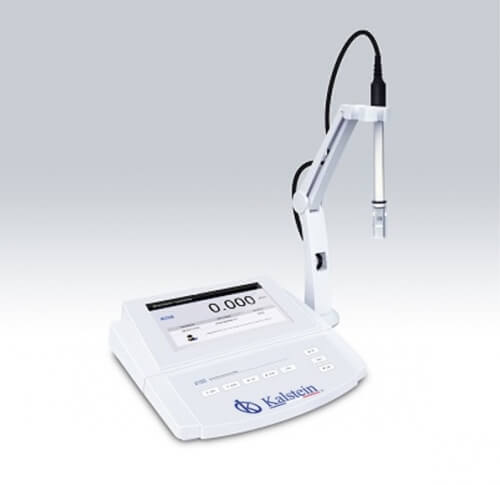
Troubleshooting Common Issues with the YR01828-2 Conductivity Meter
The YR01828-2 Conductivity Meter is a professional-grade bench-top instrument designed for measuring conductivity, TDS (Total Dissolved Solids), salinity, and resistivity. While it is engineered for high precision and reliability, users may encounter issues that can affect its performance. This guide delves into common symptoms, their probable causes, and actionable solutions to ensure your YR01828-2 remains in optimal working condition.
Understanding the YR01828-2 Conductivity Meter
The YR01828-2 is equipped with advanced features including a 7-inch TFT screen, 1 to 3-point calibration, automatic temperature compensation, and various measurement modes. It offers exceptional accuracy of ±0.5% F.S., making it suitable for laboratory and industrial applications. Understanding the operational principles of the YR01828-2 will help in troubleshooting effectively.
Technical Specifications of the YR01828-2
| Model | YR01828-2 |
|---|---|
| Conductivity Range | 0.01 to 20.00, 200.0, 2000µS/cm, 20.00, 200.0mS/cm |
| Resolution | 0.001, 0.01, 0.1, 1 |
| Accuracy | ±0.5% F.S. |
| Calibration Points | 1 to 3 points |
| TDS Range | 0 to 10.00, 100.0, 1000mg/L, 10.00, 200.0g/L |
| Salinity Range | 0.00 to 80.00ppt |
| Resistivity Range | 0.00 to 30.00MΩ |
Troubleshooting by Symptoms
This section addresses specific symptoms users may encounter with the YR01828-2, alongside potential causes and solutions.
Equipment Does Not Power On
If your YR01828-2 does not power on, check the following:
- Power Supply: Ensure the device is connected to a functional power outlet and that the power adapter is working correctly.
- Power Switch: Verify that the power switch is in the 'ON' position.
If both are functioning, the issue may be internal, requiring professional servicing.
Error Code E-03
Error code E-03 indicates a calibration error. Follow these steps:
- Check for recent calibration; re-calibrate if necessary.
- Ensure the calibration standards used are fresh and appropriate for the YR01828-2.
Refer to the user manual for detailed calibration procedures.
Inconsistent Readings
If your readings fluctuate significantly, consider the following causes:
- Electrode Condition: Inspect the conductivity electrode for contamination or damage. Clean or replace the electrode as needed.
- Sample Issues: Ensure the sample is homogeneous and free from bubbles or particulates that may affect measurement.
After addressing these issues, re-run your measurements for accuracy.
Common Troubleshooting Matrix
| Symptom | Possible Causes | Solutions |
|---|---|---|
| Equipment Does Not Power On | Faulty power supply, power switch off | Check power source and switch |
| Error Code E-03 | Calibration error | Re-calibrate using fresh standards |
| Inconsistent Readings | Electrode issues, sample contamination | Inspect and clean electrodes; ensure sample quality |
Best Practices for Maintaining the YR01828-2
Regular maintenance is essential for the longevity of the YR01828-2. Here are some best practices:
- Calibration: Perform calibrations regularly, following the manufacturer's recommendations.
- Cleaning: Clean electrodes after each use to prevent contamination.
- Storage: Store the device in a controlled environment when not in use to avoid damage.
Frequently Asked Questions
What types of measurements can the YR01828-2 perform?
The YR01828-2 can measure conductivity, TDS (Total Dissolved Solids), salinity, and resistivity, making it versatile for various applications.
How often should the YR01828-2 be calibrated?
Calibration frequency depends on usage, but it is generally advised to calibrate the YR01828-2 at least once a month or before critical measurements.
Can I use the YR01828-2 for field measurements?
While primarily designed for laboratory use, the YR01828-2 can be used in the field if proper precautions are taken to protect it from extreme conditions.
What should I do if I receive an error code?
Refer to the user manual for the specific error code. Troubleshoot based on the symptoms indicated, and re-calibrate or check the device as necessary.
Is there any warranty for the YR01828-2?
The YR01828-2 typically comes with a standard warranty; refer to your purchase documentation for specific terms and conditions.
Where can I find replacement parts for the YR01828-2?
Replacement parts can be sourced through authorized dealers or directly from the manufacturer. Always ensure compatibility with your specific model.
Conclusion and Call to Action
Maintaining the YR01828-2 Conductivity Meter's performance is vital for accurate measurements in laboratory and industrial settings. By understanding common symptoms and their respective solutions, users can effectively troubleshoot and maintain their devices.
If you're looking for a quote on the YR01828-2 or need assistance, please feel free to request a quote. We are here to help you find the right solutions.
If you are looking for a fusion of innovation and quality, you have come to the right place. At Kalstein, we offer you the luxury of exploring our exclusive catalog of laboratory equipment. We manufacture every device to the highest standards of excellence. Our intuitive and seamless online purchasing channels are designed for your convenience, securing the most competitive prices. Hesitate no longer — we bring science to life, it is time to become part of our community.