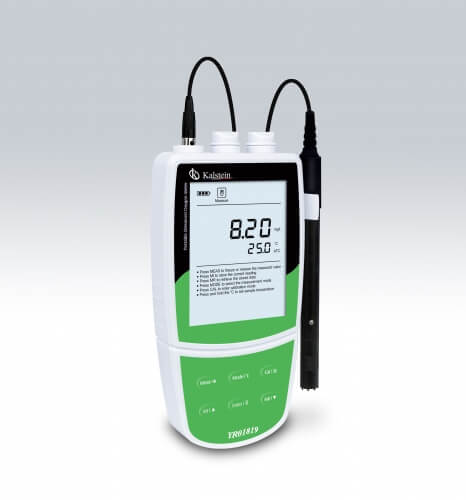
Troubleshooting Common Errors with the YR01819 Portable Dissolved Oxygen Meter
The YR01819 Portable Dissolved Oxygen Meter is an essential tool for various applications, including water treatment, aquaculture, and industrial monitoring. However, like any precision instrument, it may encounter issues that can lead to inaccuracies or failure in readings. This article focuses on troubleshooting common errors associated with the YR01819, providing practical solutions to address these issues effectively.
Common Error Symptoms and Their Troubleshooting Solutions
When using the YR01819, operators might face several symptoms that indicate a malfunction or error. Below is a detailed table listing common symptoms, their probable causes, and solutions to resolve these issues.
| Symptom | Probable Cause | Solution |
|---|---|---|
| Equipment does not power on | Battery failure or connection issue | Check battery installation; replace batteries if dead; ensure connections are secure. |
| Error code E-03 | Calibration error | Recalibrate the meter using one or two calibration points; ensure the calibration solution is fresh. |
| Inconsistent readings | Temperature compensation failure | Ensure the automatic temperature compensation feature is functioning; check for environmental temperature changes. |
| Low battery warning | Battery power is low | Replace the batteries immediately to avoid shutdown during use. |
| Readings are significantly off from expected values | Salinity or pressure correction not applied | Adjust the salinity and pressure settings manually; refer to the user manual for correct values. |
Technical Specifications of the YR01819
| Specification | Details |
|---|---|
| Model | YR01819 |
| Dissolved Oxygen Range | 0.00 to 20.00 mg/L |
| Accuracy | ±0.5 mg/L |
| Calibration Points | 1 or 2 points |
| Temperature Compensation | 0 to 50°C (automatic) |
| Memory Storage | Stores up to 100 data sets |
| Power Supply | 3 AA batteries or 5V DC adapter |
| Dimensions | 170(L)×85(W)×30(H) mm |
| Weight | 300 g |
Understanding Error Codes
The YR01819 displays error codes to alert users of potential issues. Understanding these codes can help in quick diagnosis and resolution. Here’s a deeper look at common error codes:
- E-01: Indicates a sensor fault — check the sensor connections and clean if necessary.
- E-02: Low calibration fluid — ensure that the calibration solutions are sufficient for accurate readings.
- E-03: Calibration failure — recalibrate the device properly using fresh solutions.
Calibrating the YR01819 Correctly
Calibration is crucial for accurate readings from the YR01819. It can be performed at one or two points using air-saturated water or zero oxygen solution. Here’s how to calibrate:
- Ensure the meter is clean and the sensor is properly maintained.
- Start with the zero oxygen solution to set the first calibration point, then follow with air-saturated water to establish the second point.
- Allow the meter to stabilize before locking in the calibration settings.
- Document the calibration results for future reference.
Best Practices to Avoid Common Errors
To minimize the likelihood of encountering errors with the YR01819, consider the following best practices:
- Regularly clean the sensor and housing to prevent contamination.
- Store the meter in a protective case when not in use.
- Keep the calibration solutions fresh and check their expiration dates.
- Perform routine checks on battery levels and replace them as needed.
Frequently Asked Questions
What should I do if my YR01819 does not turn on?
If the YR01819 does not power on, check the battery installation and ensure they are inserted correctly. If the batteries are old or depleted, replace them with fresh ones. Also, check for any loose connections that might prevent powering the unit.
How can I resolve inconsistent readings from the YR01819?
Inconsistent readings may stem from improper temperature compensation. Make sure that the automatic temperature compensation feature is activated. Additionally, verify that the meter has been calibrated properly before taking measurements.
What does error code E-03 mean on the YR01819?
Error code E-03 indicates a calibration failure. To resolve this, recalibrate the meter using the appropriate calibration solutions, ensuring they are fresh and capable of providing accurate reference points.
How often should I calibrate the YR01819?
Calibration frequency depends on usage conditions. It is recommended to calibrate the YR01819 before each use if measurements are critical, or at least once a week during regular operations to maintain accuracy.
Can I use the YR01819 for saltwater applications?
Yes, the YR01819 can be used for saltwater applications. However, ensure that you adjust the salinity correction settings in accordance with the specific conditions of your measurements to obtain accurate results.
What maintenance is required for the YR01819?
Regular maintenance of the YR01819 includes cleaning the sensor after every use, checking the calibration solutions for freshness, and replacing the batteries as necessary. Additionally, store the device in a protective case when not in use.
If you are looking for a fusion of innovation and quality, you have come to the right place. At Kalstein, we offer you the luxury of exploring our exclusive catalog of laboratory equipment. We manufacture every device to the highest standards of excellence. Our intuitive and seamless online purchasing channels are designed for your convenience, securing the most competitive prices. Hesitate no longer — we bring science to life, it is time to become part of our community.