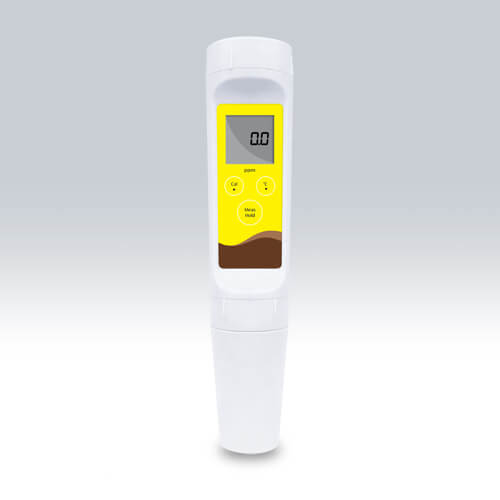
Troubleshooting Common Errors by Symptoms for the YR01811 Pocket TDS Meter
The YR01811 Pocket TDS Meter is a reliable device designed for measuring total dissolved solids in liquids, making it an essential tool for various applications, from educational environments to industrial settings. Despite its robust design and functionality, users may encounter errors that could hinder performance. This article delves into common symptoms of errors associated with the YR01811 model, providing detailed troubleshooting steps to rectify these issues effectively.
Technical Specifications of the YR01811
| Specification | Details |
|---|---|
| Model | YR01811 |
| TDS Range | 0.5 to 100.0 ppm |
| Resolution | 0.1 ppm |
| Accuracy | ±1% F.S. |
| Calibration Point | 1 point |
| Calibration Solution | 71.8 ppm |
| Temperature Range | 0 to 50 °C |
| Battery Life | Approximately 150 hours of continuous use |
| Weight | 100 g |
| Dimensions | 185(L)×40(Dia.) mm |
Common Symptoms and Troubleshooting Steps
Equipment Does Not Power On
When the YR01811 fails to power on, the following steps should be taken:
- Check Battery Status: Ensure that the batteries are inserted correctly and are not depleted. Replace the batteries if necessary.
- Inspect Battery Contacts: Check for corrosion or damage on the battery contacts and clean if needed.
- Look for Physical Damage: Inspect the meter for any signs of damage caused by drops or exposure to moisture.
Inconsistent Readings
If the meter provides inconsistent readings, consider the following:
- Calibration Issues: Ensure that the meter is properly calibrated. Refer to the calibration procedure to recalibrate if necessary.
- Electrode Condition: Check the condition of the electrode. If it appears worn or damaged, it may need to be replaced.
- Sample Quality: Ensure that the sample being tested is well-mixed and free from bubbles or particulate that could affect readings.
Error Code E-03
Error code E-03 typically indicates a sensor failure or malfunction. Follow these steps:
- Reconnect the Sensor: Make sure the sensor is securely connected to the meter.
- Inspect for Damage: Look for any visible damage on the sensor. If damaged, replacement is necessary.
- Check Calibration: Ensure that the meter is calibrated correctly using the appropriate calibration solution.
Low Battery Indicator
A low battery warning may appear if the batteries are nearing depletion. Here’s what to do:
- Replace Batteries: Change the batteries with fresh ones to ensure optimal performance.
- Check for Power Drain: Ensure that the auto-off function is working correctly to preserve battery life.
Display Shows Erroneous Values
If the display shows values that seem incorrect, consider the following troubleshooting steps:
- Calibration: Re-calibrate the meter as erroneous values often result from improper calibration.
- Environmental Factors: Ensure the meter is used within its operational temperature range, as extreme temperatures can affect readings.
Symptom-Cause-Solution Matrix
| Symptom | Probable Cause | Solution |
|---|---|---|
| Equipment does not power on | Depleted batteries | Replace batteries |
| Equipment does not power on | Corroded battery contacts | Clean contacts |
| Inconsistent readings | Improper calibration | Recalibrate the meter |
| Error code E-03 | Sensor failure | Inspect and replace sensor if needed |
| Display shows erroneous values | Calibration issues | Recalibrate the meter |
Frequently Asked Questions
What should I do if my YR01811 Pocket TDS Meter shows an error code?
If your YR01811 displays an error code, refer to the troubleshooting matrix outlined above. Many error codes, such as E-03, can often be resolved by checking connections, recalibrating, or replacing faulty components.
How often should I calibrate my YR01811 Pocket TDS Meter?
It is recommended to calibrate your YR01811 Pocket TDS Meter before each use for the most accurate measurements, especially if it has been transported or exposed to extreme conditions.
Can I replace the sensor on the YR01811 Pocket TDS Meter?
Yes, the YR01811 features a replaceable electrode module. If you notice performance deterioration, consider replacing the sensor to restore accuracy.
What is the battery life of the YR01811 Pocket TDS Meter?
The YR01811 Pocket TDS Meter is designed to last approximately 150 hours of continuous use on standard batteries. However, this may vary based on usage patterns.
What environmental conditions should I consider when using the YR01811?
Ensure that the YR01811 is used within its specified temperature range of 0 to 50 °C. Avoid exposing the device to moisture or extreme temperatures which can affect performance.
Conclusion
By understanding the common symptoms that may arise with the YR01811 Pocket TDS Meter and following the troubleshooting steps outlined, you can ensure accurate readings and reliable performance. If you face persistent issues that are not resolved through these steps, consider reaching out for professional assistance to maintain the longevity of your device.
If you are looking for a fusion of innovation and quality, you have come to the right place. At Kalstein, we offer you the luxury of exploring our exclusive catalog of laboratory equipment. We manufacture every device to the highest standards of excellence. Our intuitive and seamless online purchasing channels are designed for your convenience, securing the most competitive prices. Hesitate no longer — we bring science to life, it is time to become part of our community.