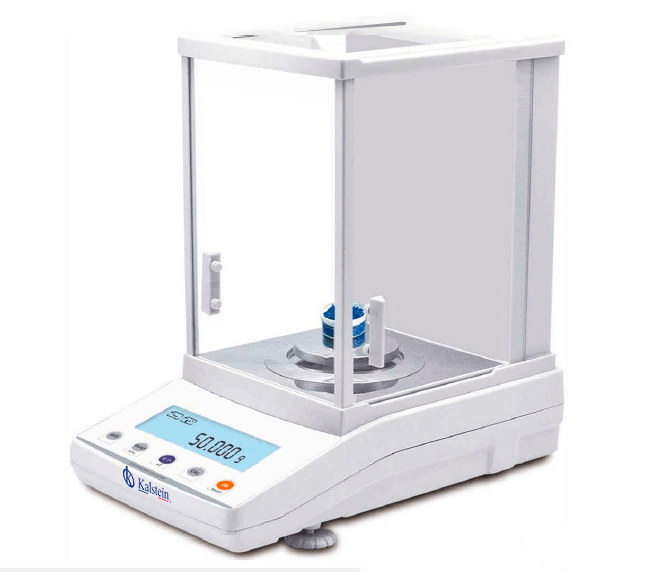
Troubleshooting Common Errors by Symptoms for the YR05769 Analytical Balance
The YR05769 Analytical Balance is a sophisticated piece of laboratory equipment designed for precise measurements. However, like any intricate device, it can occasionally present issues that require troubleshooting. This article aims to provide a structured approach to resolve common errors based on symptoms experienced by operators. By understanding potential causes and solutions, you can ensure the YR05769 continues to deliver accurate results.
Technical Specifications of YR05769
| Model | Capacity | Readability | Minimum Weighing | Repeatability |
|---|---|---|---|---|
| YR05769 | 200g | 0.001g | 0.004g | ±0.002g |
Common Symptoms and Troubleshooting Procedures
Identifying the symptom is the first step in properly addressing any issues with the YR05769. Below are common symptoms, potential causes, and corrective actions for each.
Equipment Does Not Power On
When the YR05769 does not power up, it can be frustrating. Here are probable causes and solutions:
- Cause: No power supply.
- Solution: Check if the device is plugged in and if the outlet is functioning.
- Cause: Faulty power cord.
- Solution: Inspect the power cord for any visible damage and replace if necessary.
- Cause: Internal fuse blown.
- Solution: Open the device according to the manufacturer's instructions and replace the fuse.
Error Code E-03
Error code E-03 typically indicates an issue with the balance calibration. Follow these steps to resolve it:
- Cause: Insufficient calibration weight.
- Solution: Ensure that the correct calibration weight (200g) is used for calibration.
- Cause: Calibration procedure not followed.
- Solution: Consult the user manual and re-perform the calibration steps.
Inconsistent Readings
Inconsistent readings can lead to unreliable data. Here’s how to diagnose the issue:
- Cause: Air drafts.
- Solution: Ensure the balance is in a draft-free area; consider using the windscreen if not already in place.
- Cause: Vibrations from surrounding equipment.
- Solution: Move the balance to a more stable surface away from vibrating machinery.
- Cause: Dirty weighing pan.
- Solution: Clean the weighing pan gently with a suitable solvent.
Symptom-Cause-Solution Table
| Symptom | Cause | Solution |
|---|---|---|
| Equipment does not power on | No power supply | Check outlet and plug |
| Equipment does not power on | Faulty power cord | Inspect and replace the cord |
| Error code E-03 | Insufficient calibration weight | Use correct weight for calibration |
| Error code E-03 | Calibration procedure not followed | Re-perform calibration as per manual |
| Inconsistent readings | Air drafts | Relocate to a draft-free area |
| Inconsistent readings | Vibrations from surrounding equipment | Stabilize on a solid surface |
Frequently Asked Questions
What should I do if the YR05769 displays an error code?
If the YR05769 displays an error code, refer to the user manual for a list of error messages and their meanings. Follow the recommended troubleshooting steps for accurate resolution.
How often should I calibrate the YR05769 Analytical Balance?
Calibration frequency depends on usage. It is advised to calibrate the YR05769 at least once a day, or more frequently if used for critical measurements.
Can I use the YR05769 in different environmental conditions?
The YR05769 is designed for optimal performance in a temperature range of 15-35°C. Ensure that the operating environment adheres to this specification for accurate results.
What is the maximum weight I can measure with the YR05769?
The YR05769 has a maximum capacity of 200g. Weighing above this limit may lead to inaccuracies or damage.
Is there a warranty for the YR05769 Analytical Balance?
Yes, the YR05769 typically comes with a standard warranty which outlines the terms of coverage, including repairs for manufacturing defects within a specific timeframe.
How do I clean the YR05769 Analytical Balance?
To clean the YR05769, use a soft cloth with a mild solvent. Avoid abrasive materials that may scratch the surface. Ensure the device is powered off before cleaning.
What optional accessories are available for the YR05769?
Optional accessories for the YR05769 include a printer for data output and a dust cover for protecting the balance when not in use. Check compatibility before purchase.
If you are looking for a fusion of innovation and quality, you have come to the right place. At Kalstein, we offer you the luxury of exploring our exclusive catalog of laboratory equipment. We manufacture every device to the highest standards of excellence. Our intuitive and seamless online purchasing channels are designed for your convenience, securing the most competitive prices. Hesitate no longer — we bring science to life, it is time to become part of our community.