Troubleshooting Common Errors with the YR05772 Analytical Balance
The YR05772 Analytical Balance is an essential tool in many laboratory settings, providing precise measurements crucial for scientific research and industrial applications. However, like any sophisticated equipment, it may occasionally present challenges or errors during operation. This guide focuses on troubleshooting common errors by symptom, helping operators quickly identify and resolve issues to maintain optimal performance.
Understanding the YR05772 Analytical Balance
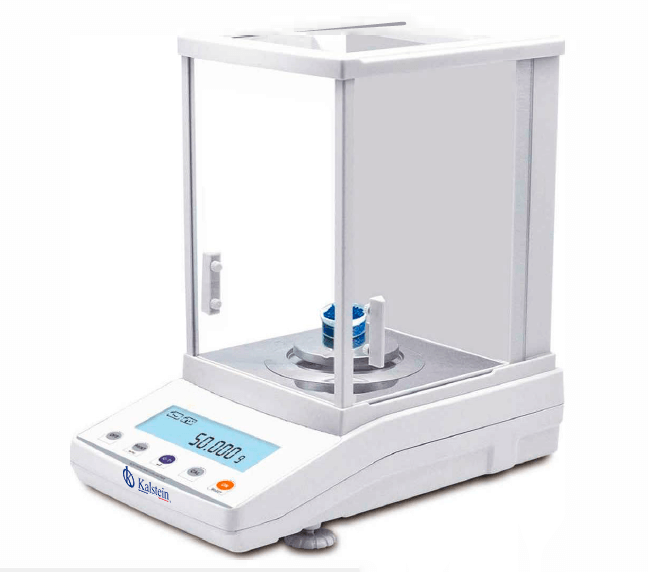
The YR05772 model features a robust design, equipped with an electromagnetic sensor and a durable aluminum casing. It supports internal calibration with the JA-N system and includes a large windproof cover to protect sensitive measurements from environmental disturbances. With an LCD display that features a white backlight and black characters, the YR05772 is user-friendly and essential for accurate readings.
Technical Specifications of the YR05772
| Specification | Details |
|---|---|
| Model | YR05772 |
| Capacity | 600g |
| Readability | 0.001g |
| Minimum Weighing | 0.004g |
| Repeatability | ±0.002g |
| Linearity | ±0.003g |
| Stabilization Time | ≤3S |
| Communication | RS232 (standard)/ USB (optional) |
| Calibration | External Calibration |
Troubleshooting by Symptoms
This section addresses common symptoms encountered while using the YR05772 Analytical Balance, providing probable causes and solutions for each issue.
Equipment Does Not Power On
If your YR05772 does not power on, check the following:
- Power Supply: Ensure that the balance is properly connected to a working power outlet.
- Circuit Breaker: Check the circuit breaker in the facility to ensure it has not tripped.
- Internal Faults: Inspect for any visible damage to the power cord or connectors.
To resolve this issue, reconnect the power supply and ensure it is functional. If the problem persists, consult a technician for internal assessment.
Error Code E-03
Error code E-03 typically indicates an overload condition. Possible causes include:
- Excess Weight: Ensure that the weight placed on the balance does not exceed 600g.
- Improper Calibration: The balance may require recalibration.
To fix this, remove excess weight and recalibrate the balance following the manufacturer's guidelines.
Inconsistent Readings
Inconsistent readings can be frustrating and may stem from several factors:
- Environmental Factors: Airflow or vibrations can affect readings. Ensure the balance is in a stable environment.
- Calibration Issues: Lack of recent calibration may lead to discrepancies.
To troubleshoot, relocate the balance to a less drafty area, and perform a recalibration.
Display Shows “Tare Error”
A “Tare Error” message indicates a problem with the tare function. Potential causes include:
- Incorrect Initial Tare: Make sure that the balance is zeroed correctly before placing any container.
To resolve this issue, clear the balance and attempt the tare function once more.
Frequent Overload Alarms
Frequent overload alarms may indicate several underlying problems:
- Overloading: Continuously placing excessive weight can damage the balance.
- Calibration Drift: The balance may need recalibration.
To address this, ensure weights do not exceed the specified limits and recalibrate as necessary.
Symptom-Cause-Solution Matrix
| Symptom | Possible Cause | Solution |
|---|---|---|
| Equipment does not power on | Power supply issues | Check power connections and circuit breakers |
| Error code E-03 | Overload condition | Remove excess weight and recalibrate |
| Inconsistent readings | Environmental factors | Relocate balance, check calibration |
| Tare error | Incorrect initial tare | Reset balance and tare again |
| Frequent overload alarms | Overloading | Ensure weight limits are adhered to |
Frequently Asked Questions
What should I do if my YR05772 Analytical Balance displays an error code?
If your YR05772 displays an error code, refer to the troubleshooting section of the user manual. Identify the specific error code to find appropriate solutions and corrective actions.
How often should I perform calibration on my YR05772?
Calibration should be performed regularly, ideally before significant use or whenever environmental conditions change. Refer to the user manual for specific calibration guidelines.
Can I use the YR05772 in a high-vibration environment?
The YR05772 is not designed for high-vibration environments. It is essential to place the balance on a stable surface away from vibrations to ensure accurate readings.
What is the maximum capacity of the YR05772 Analytical Balance?
The maximum capacity of the YR05772 is 600g. Exceeding this limit may cause an overload error or damage the balance.
Is it necessary to use a draft shield with the YR05772?
While the YR05772 has a windproof cover, using a draft shield can further minimize environmental interference, leading to more accurate measurements.
Where can I find replacement parts for the YR05772?
Replacement parts for the YR05772 can typically be obtained through authorized dealers or directly from the manufacturer’s service department.
What are the signs that my YR05772 Analytical Balance needs to be replaced?
Signs that may indicate your balance needs replacement include persistent error codes, consistent inconsistencies in measurements, or physical damage that affects performance.
If you are looking for a fusion of innovation and quality, you have come to the right place. At Kalstein, we offer you the luxury of exploring our exclusive catalog of laboratory equipment. We manufacture every device to the highest standards of excellence. Our intuitive and seamless online purchasing channels are designed for your convenience, securing the most competitive prices. Hesitate no longer — we bring science to life, it is time to become part of our community.