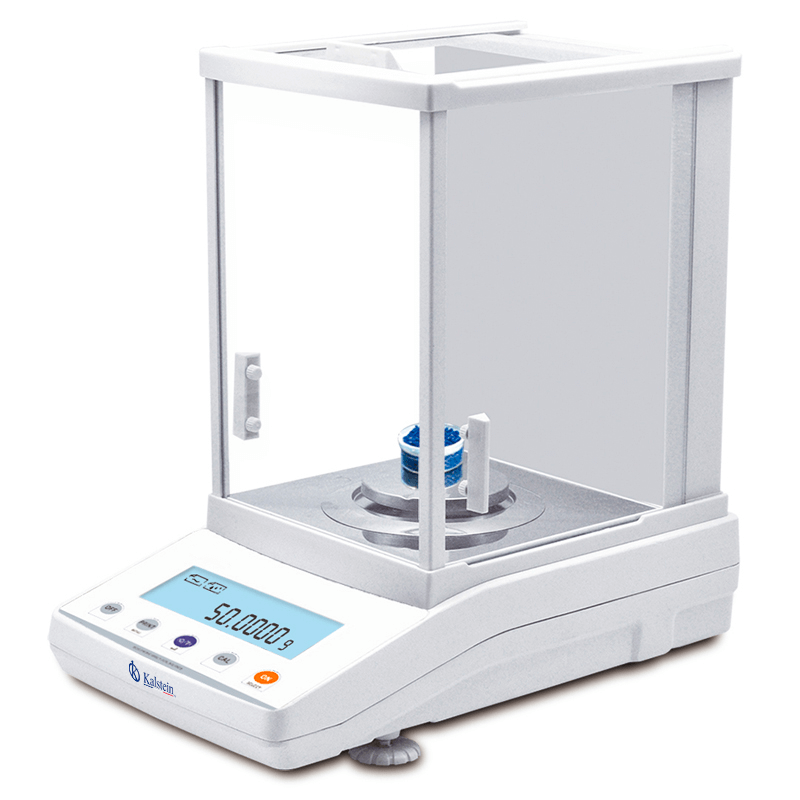
Troubleshooting Common Errors in the YR05580 Analytical Balance
The YR05580 Analytical Balance is an exceptional instrument designed for precision measurements in laboratory environments. However, like any sophisticated piece of equipment, it may experience operational issues that require troubleshooting. Understanding the common error symptoms, their causes, and the corresponding solutions is essential for maintaining optimal performance of the YR05580. This article delves into frequent errors and offers practical troubleshooting techniques.
Technical Specifications of YR05580
| Model | Brand | Category | Subcategory | Price (USD) | Gross Weight (kg) | Dimensions (mm) |
|---|---|---|---|---|---|---|
| YR05580 | Kalstein | Balances | Analytical Balance | 285.00 | 11 | 340 x 215 x 350 |
Troubleshooting by Symptoms
This section categorizes common symptoms that operators may experience with the YR05580 analytical balance. Each symptom is followed by probable causes and suggested solutions to aid in effective troubleshooting.
Equipment Does Not Power On
Operators may encounter a situation where the YR05580 does not power on. This can be frustrating, but there are several potential causes:
- Power Source Issues: Ensure that the balance is connected to a working power outlet. Check for any tripped circuit breakers.
- Faulty Power Cable: Inspect the power cord for any visible damage or wear that may impede functionality.
Solution: Test with a different power outlet or replace the power cord if necessary.
Error Code E-03
The appearance of error code E-03 on the YR05580 typically indicates a calibration error. This may be caused by:
- Environmental Interference: Excessive vibrations or air currents can affect balance precision.
- Calibration Weight Issues: Ensure that the calibration weight used is appropriate for the model and has not been misplaced or damaged.
Solution: Re-calibrate the balance in a stable environment and use certified calibration weights.
Inconsistent Readings
If measurements appear inconsistent, this could be due to:
- Sample Handling Errors: Improper placement of samples may skew results.
- Environmental Conditions: Fluctuations in temperature or humidity can affect readings.
Solution: Ensure samples are placed correctly on the balance and maintain stable environmental conditions.
Display Malfunctions
Occasionally, the LCD display may malfunction, leading to unclear results. Possible causes include:
- Power Fluctuations: Sudden voltage changes may disrupt display functionality.
- Internal Hardware Failure: A malfunction within the balance's internal components may cause display issues.
Solution: Restart the balance and ensure stable power supply. If issues persist, contact technical support.
Symptom-Cause-Solution Matrix
| Symptom | Probable Cause | Solution |
|---|---|---|
| Equipment does not power on | Power source issues, faulty power cable | Test a different outlet or replace the power cable |
| Error code E-03 | Calibration error due to environmental factors | Re-calibrate in a stable environment |
| Inconsistent readings | Sample handling errors, environmental conditions | Correct sample placement and stabilize environment |
| Display malfunctions | Power fluctuations, internal hardware failure | Restart balance, check power supply |
Frequently Asked Questions
What should I do if my YR05580 balance gives an error reading?
If the YR05580 displays an error code, consult the troubleshooting guide in the manual. Common errors often have straightforward solutions, such as recalibrating the device or checking environmental conditions.
How often should I calibrate my YR05580 analytical balance?
It is recommended to calibrate the YR05580 at least once a day or before any crucial weighing session to ensure accurate results.
Can I connect the YR05580 to a printer for record-keeping?
Yes, the YR05580 supports connections to printers, which can assist in documenting weighing results efficiently.
What is the maximum capacity of the YR05580 balance?
The YR05580 has a maximum capacity of 100 grams, making it suitable for various laboratory applications.
How do I maintain the YR05580 for optimal performance?
Regular cleaning, periodic calibration, and ensuring it operates within specified environmental conditions are key to maintaining the YR05580's performance.
Conclusion
Troubleshooting the YR05580 analytical balance requires a methodical approach to identify symptoms, causes, and solutions. By understanding the common issues that may arise, operators can ensure the balance functions correctly, providing accurate and reliable measurements.
If you are looking to optimize your weighing processes with the YR05580 analytical balance, do not hesitate to request a quote. Our team at Kalstein is ready to assist you in enhancing your laboratory or industrial operations.
If you are looking for a fusion of innovation and quality, you have come to the right place. At Kalstein, we offer you the luxury of exploring our exclusive catalog of laboratory equipment. We manufacture every device to the highest standards of excellence. Our intuitive and seamless online purchasing channels are designed for your convenience, securing the most competitive prices. Hesitate no longer — we bring science to life, it is time to become part of our community.