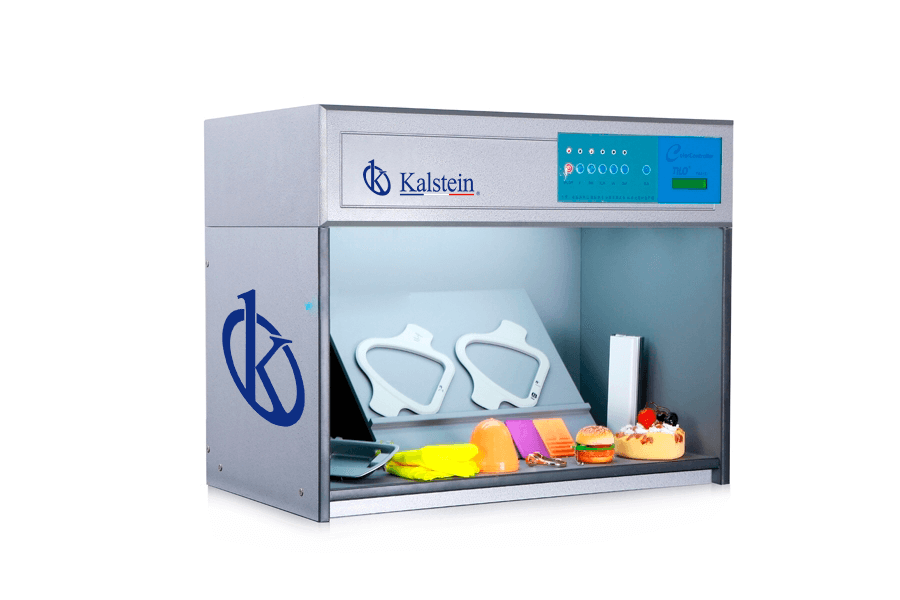
Troubleshooting Common Errors with the YR05528 Color Light Box
The YR05528 Color Light Box is an essential instrument in various industries, including graphic arts, textiles, and automotive, where accurate color evaluation is critical. However, users may encounter errors that can hinder performance. This guide explores common symptoms, their causes, and effective troubleshooting methods to ensure optimal functionality of the YR05528.
Understanding the YR05528 Color Light Box
The YR05528 is designed to provide consistent and accurate color evaluation through its multiple light sources, including D65, TL84, UV, and others. It is built to uphold international standards for color assessment and is pivotal for industries that rely on color fidelity. Understanding how to troubleshoot issues with this model is crucial for maintaining its performance.
Technical Specifications of YR05528
| Specification | Details |
|---|---|
| Model | YR05528 |
| Light Sources | D65, TL84, UV, A, CWF, TL83 |
| Dimensions (W x D x H) | 710 x 530 x 570 mm |
| Weight | 28 kg |
| Voltage | 220V |
| Power Consumption | Low energy consumption with minimal heat output |
Troubleshooting Symptoms
When operating the YR05528, users may experience several common symptoms. Each symptom can arise from various underlying issues. Below is a structured approach to diagnosing and correcting these problems.
Equipment Does Not Power On
If the YR05528 does not power on, check the following:
- Power Connection: Ensure the power cable is securely connected to both the device and the power outlet.
- Power Supply: Verify that the outlet is functioning by testing it with another device.
- Internal Fuse: Check and replace the internal fuse if necessary.
Common causes include faulty power supply or damaged power cable.
Error Code E-03 Displayed
Error code E-03 may indicate a malfunction with one of the light sources. Follow these steps:
- Light Source Check: Inspect each light source for functionality. Replace any non-functioning bulbs.
- Reset Device: Turn off the device, wait a few minutes, and turn it back on to reset the error.
- Internal Connections: Check internal wiring connections for loose or damaged parts.
Causes may include burned-out bulbs or loose connections.
Inconsistent Color Readings
Inconsistent readings can undermine the reliability of color assessments. Consider the following troubleshooting steps:
- Calibration: Ensure that the device is properly calibrated and reset it if necessary.
- Light Source Configuration: Verify that the correct light sources are selected for the tests being conducted.
- Sample Preparation: Ensure samples are prepared consistently under the same conditions.
Common causes include calibration drift or improper sample handling.
Symptom-Cause-Solution Matrix
| Symptom | Probable Cause | Solution |
|---|---|---|
| Equipment Does Not Power On | Faulty power connection or supply | Check cables, outlet; replace fuse if needed |
| Error Code E-03 Displayed | Malfunctioning light source | Inspect/replaced bulbs; reset device |
| Inconsistent Color Readings | Calibration issues or sample preparation | Recalibrate; ensure consistent sample conditions |
Frequently Asked Questions
What are the standard light sources in the YR05528 Color Light Box?
The YR05528 Color Light Box utilizes multiple light sources, including D65, TL84, UV, A, CWF, and TL83, to ensure a comprehensive color evaluation experience.
How can I ensure accurate color readings with the YR05528?
To ensure accurate readings, calibrate the device regularly, maintain consistent sample conditions, and use the appropriate light sources for your specific evaluations.
Is there a maintenance routine for the YR05528?
Regular maintenance includes checking the functionality of light sources, recalibrating as needed, and ensuring that the internal components are clean and free of dust.
What should I do if a light source burns out?
If a light source burns out, replace it promptly with a compatible bulb, referring to the user manual for specifications and replacement procedures.
Can I customize the YR05528 for specific industry needs?
Yes, the YR05528 can be customized with different configurations and light source setups to meet the requirements of various industries.
What is the expected lifespan of the YR05528?
The expected lifespan of the YR05528 depends on usage and maintenance but generally lasts several years with proper care. Regular checks and timely replacements of components can extend its lifespan.
Where can I obtain replacement parts for the YR05528?
Replacement parts for the YR05528 can be obtained through authorized distributors. It's recommended to check with the manufacturer for genuine parts to ensure compatibility and performance.
If you are looking for a fusion of innovation and quality, you have come to the right place. At Kalstein, we offer you the luxury of exploring our exclusive catalog of laboratory equipment. We manufacture every device to the highest standards of excellence. Our intuitive and seamless online purchasing channels are designed for your convenience, securing the most competitive prices. Hesitate no longer — we bring science to life, it is time to become part of our community.