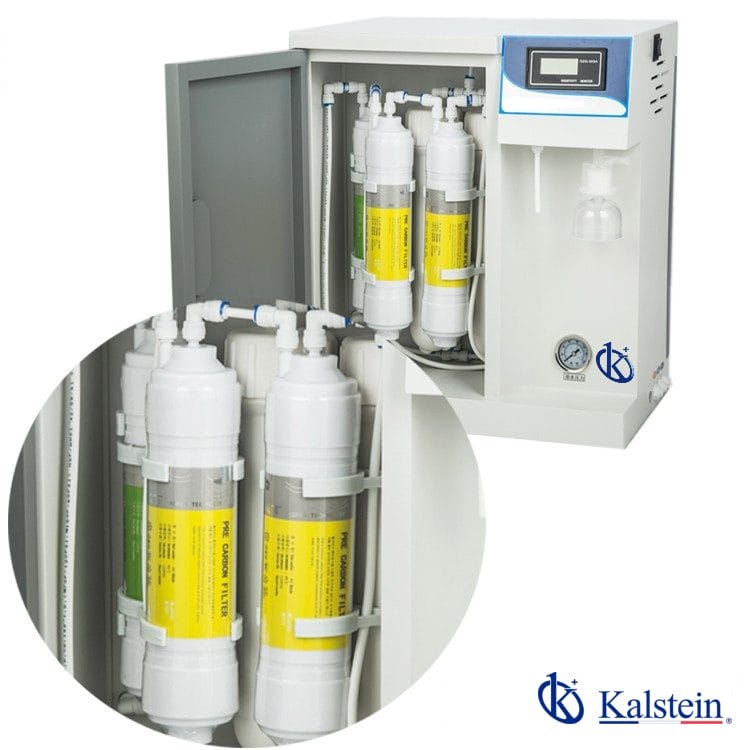
Installation and Startup Guide for the YR58-1 Deionized Water System
The YR58-1 Deionized Water System is designed to provide high-quality deionized water for various applications, including analytical laboratories, clinical settings, and industrial processes. Proper installation and startup are crucial for ensuring optimal performance and longevity of the system. This detailed guide will walk you through the essential steps needed to install and initialize the YR58-1 effectively.
Overview of the YR58-1 Deionized Water System
The YR58-1 is equipped with advanced features that enhance its usability and efficiency. It includes a rapid insertion filter column, an online water quality monitoring system, and a user-friendly LCD interface. Understanding these features is essential before proceeding with the installation.
Technical Specifications of the YR58-1
| Model | YR58-1 |
|---|---|
| Feed Water Requirement | Tap water, inlet pressure: 0.15-0.5MPa, temperature: 5-40°C |
| Capacity | 30L/H |
| Flow Rate | 1.5-2L/min (with pressure barrel) |
| Output Water Quality | RO water: desalination rate of 95-99%, TDS<10ppm; Deionized water: resistivity 10-16MΩ.cm@25°C, conductivity: ≦0.1 μs/cm |
| Power Supply | 220V/50Hz; 48W |
| Dimensions (mm) | L*W*H: 41*27*50cm |
| Standard Configuration | Machine (including 1 set of consumable filters) + 12L pressure tank + accessory package |
Unboxing and Setup Checklist
Before installation, ensure you have all included components as per the standard configuration. Here's a checklist:
- YR58-1 machine
- 12L pressure tank
- Set of consumable filters
- Accessory package
- Power cable
- User manual
Installation Steps for the YR58-1
- Determine Location: Select a clean, dry location with adequate ventilation, away from sunlight and vibrations.
- Level the Unit: Use a spirit level to ensure the YR58-1 is perfectly horizontal.
- Connect Water Supply: Connect the tap water supply to the machine's inlet. Ensure that the pressure is within the specified range.
- Connect Power Supply: Plug the power cable into the designated outlet, ensuring it meets the voltage and frequency requirements.
- Start the System: Power on the YR58-1 and follow the prompts on the LCD interface for initial setup.
- Calibration: Calibrate the system as instructed in the user manual to ensure accurate readings.
- First Run: Run the system for a few minutes, monitoring water quality output.
Common Installation Mistakes
To ensure smooth installation, be aware of these common pitfalls:
- Improper leveling, leading to water drainage issues.
- Incorrect water connection that may cause leaks or inadequate pressure.
- Failing to calibrate the system post-installation.
Startup Procedures After Installation
After the YR58-1 is installed, the startup procedure is vital for optimal performance. Follow these steps:
- Ensure all connections are secure.
- Power on the unit and check the LCD display for any error messages.
- Monitor the first output of water quality, ensuring it meets specified standards.
- Document the initial performance metrics for future reference.
Troubleshooting Common Startup Issues
During startup, you may encounter specific issues. Refer to the following table for troubleshooting:
| Symptom | Possible Cause | Solution |
|---|---|---|
| No Power | Power supply issue | Check connections; ensure the outlet is functional. |
| Error Code E-03 | Water quality below standards | Check filter status; replace if necessary. |
| Inconsistent Readings | Calibrations not performed | Recalibrate according to the manual. |
Frequently Asked Questions
What is the maximum capacity of the YR58-1 Deionized Water System?
The YR58-1 has a maximum capacity of 30 liters per hour, making it suitable for various applications requiring consistent deionized water output.
How do I know when to replace the filters in the YR58-1?
Filter replacement should be based on the water quality monitoring system readings. Regular checks can indicate when the filters are no longer performing efficiently.
Can I use the YR58-1 in a laboratory setting?
Yes, the YR58-1 is specifically designed for laboratory applications, including analytical and clinical uses where high-quality deionized water is essential.
What is the warranty period for the YR58-1 Deionized Water System?
The warranty period for the YR58-1 typically covers one year from the date of purchase, subject to terms and conditions specified in the user manual.
Is the YR58-1 suitable for industrial applications?
Yes, the YR58-1 is versatile and can be adapted for various industrial applications requiring deionized water, such as manufacturing and chemical processing.
How do I monitor the water quality produced by the YR58-1?
The system is equipped with an online water quality monitoring feature that provides real-time data on the quality of the produced water, ensuring it meets required standards.
What is the best practice for maintaining the YR58-1 Deionized Water System?
Regular maintenance includes monitoring water quality, replacing filters as necessary, and ensuring all connections are secure to prevent leaks and ensure optimal performance.
If you are looking for a fusion of innovation and quality, you have come to the right place. At Kalstein, we offer you the luxury of exploring our exclusive catalog of laboratory equipment. We manufacture every device to the highest standards of excellence. Our intuitive and seamless online purchasing channels are designed for your convenience, securing the most competitive prices. Hesitate no longer — we bring science to life, it is time to become part of our community.