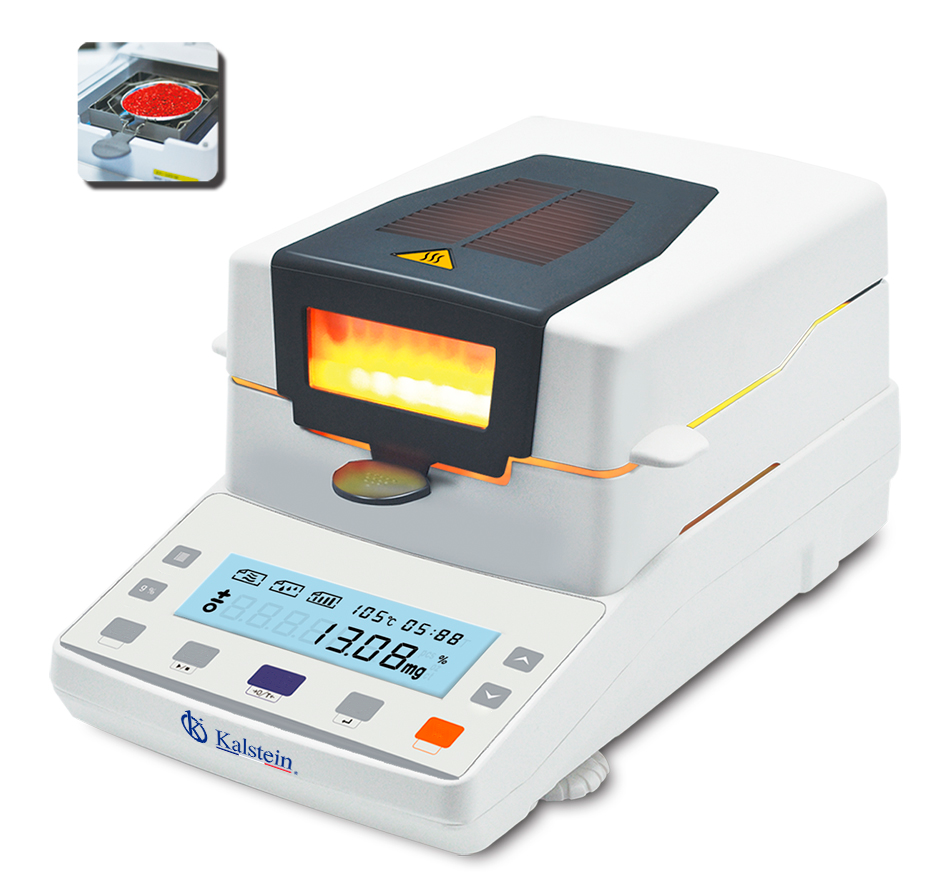
Installation and Setup Guide for the Halogen Moisture Analyzer YR05554
The Halogen Moisture Analyzer YR05554 is a precise instrument designed for measuring moisture content in a variety of samples. This guide outlines the necessary steps for installation and initial setup, which are crucial for optimal performance and accuracy of the instrument.
Unboxing and Initial Inspection
Upon receiving the YR05554, carefully unbox the unit and inspect all components to ensure nothing is damaged or missing. Your package should include:
- Halogen Moisture Analyzer YR05554
- Power cord
- User manual
- Calibration weights
- Optional accessories (if purchased)
Make sure to keep the packaging in case you need to return or exchange the product.
Site Requirements and Preparation
Before installation, ensure that your laboratory meets the following site requirements:
- Temperature range: 5℃ to 35℃
- Humidity: 0% to 100%
- Power supply: 220V ±15% 50HZ or 110V ±15% 60HZ
- Clearance: Ensure there is adequate space around the device for ventilation
- Stable surface: Place the analyzer on a level and stable surface to avoid vibrations
Securing the Analyzer
Once the site meets the requirements, position the YR05554 on your chosen surface. Ensure that the unit is level and secure to prevent tipping during operation.
Power-Up Sequence
To power up your Halogen Moisture Analyzer YR05554, follow these steps:
- Connect the power cord to the analyzer and the appropriate power outlet.
- Turn on the power switch located on the back of the device.
- Wait for the LCD screen to illuminate; this indicates that the unit is booting up.
Calibration Process
Calibration is essential for ensuring accurate measurements. Here’s how to calibrate the YR05554:
- Prepare calibration weights that are within the specified capacity of 110g.
- Access the calibration menu on the LCD screen.
- Follow the on-screen prompts to calibrate the device using the calibration weights.
- Once calibration is complete, perform a test measurement to verify accuracy.
Common Setup Mistakes
During the installation and setup, be aware of these common mistakes that users frequently make:
- Not ensuring that the device is level, which can lead to inaccurate readings.
- Forgetting to calibrate the unit before first use.
- Connecting to an incorrect power supply, risking damage to the unit.
Technical Specifications of YR05554
| Model | YR05554 |
| Maximum Capacity | 110g |
| Readability | 0.002g |
| Operating Temperature | 5℃-35℃ |
| Monitor | LCD (white backlight with black text) |
| Calibration | External Calibration |
| Interface | RS232/RJ45/USB... |
| Pan Size | Ø90mm |
| Packaging Size | 490x350x360mm |
| Gross Weight | 7.5 kg |
| Heating Source | Halogen Lamp |
| Temperature Range | 40 ℃-199 ℃ |
| Humidity Range | 0.00%-100.00% |
Frequently Asked Questions
What is the first step in using the YR05554 after installation?
The first step after installation is to power up the device and perform an initial calibration using the provided calibration weights. This ensures that the measurements taken will be accurate from the outset.
How can I ensure the accuracy of my readings?
To ensure the accuracy of your readings, regularly calibrate the YR05554 using certified weights and perform routine maintenance, which includes cleaning the pan and ensuring the device is level.
What should I do if the YR05554 displays an error code?
If an error code appears on the display, refer to the user manual to identify the specific error and follow the recommended troubleshooting steps to resolve the issue.
How often should the YR05554 be serviced?
The YR05554 should be serviced at least once a year, depending on the frequency of use, to maintain its accuracy and functionality.
Can I connect the YR05554 to a computer for data analysis?
Yes, the YR05554 has interfaces such as RS232/RJ45/USB that allow for easy connection to a computer for data transfer and analysis.
What types of samples can be analyzed with the YR05554?
The YR05554 is versatile and can analyze a wide range of samples, including powders, granules, and liquid substances, making it suitable for various applications in laboratories and industries.
If you are looking for a fusion of innovation and quality, you have come to the right place. At Kalstein, we offer you the luxury of exploring our exclusive catalog of laboratory equipment. We manufacture every device to the highest standards of excellence. Our intuitive and seamless online purchasing channels are designed for your convenience, securing the most competitive prices. Hesitate no longer — we bring science to life, it is time to become part of our community.