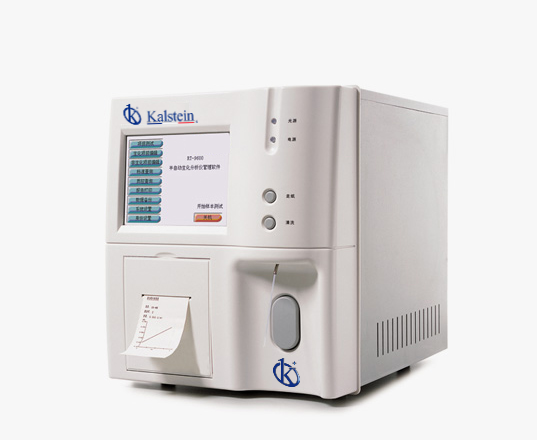
Comprehensive Installation Guide for the YR05116 Semi-Automatic Chemistry Analyzer
The YR05116 Semi-Automatic Chemistry Analyzer is a state-of-the-art instrument designed to meet the needs for chemical analysis in modern laboratories. This article serves as a comprehensive guide for the installation and commissioning of the YR05116 to ensure it operates at peak performance from day one.
Understanding the YR05116: Features and Specifications
| Model | YR05116 |
|---|---|
| Absorbance Range | -0.500 - 3.500 Abs |
| Resolution | 0.001 Abs (displayed), 0.0001 Abs (calculated) |
| Light Source | Halogen Lamp, 12V/20W |
| Wavelengths | Continuous grating adjustment, range 330 - 800 nm, 1 nm step adjustment |
| Wavelength Accuracy | ± 1 nm |
| Bandwidth | < 6 nm |
| Flow Cell | Metal - quartz flow cell |
| Temperature Control | 25 °C, 30 °C, 37 °C. ± 0.1 °C and ambient temperature |
| Crossover Contamination Rate | < 1% |
| Display | 6.4" Color/Mono LCD |
| Output | Integrated printer or external printer |
| Input | Touch screen, optional mouse and keyboard |
| Interface | RS-232, VGA support, 2 USB, SD, Ethernet |
| Language | English or other languages upon request |
| Power Supply | AC 110V/220V ± 10%, 50 60Hz |
| Net Weight | 13.5 kg |
| Dimensions (L x W x H in mm) | 370 x 284 x 318 |
Installation Process Overview
The installation of the YR05116 involves several critical steps to ensure it operates correctly and efficiently. This section outlines the necessary actions from unboxing to first-run calibration.
Unboxing Checklist
- YR05116 Analyzer Unit
- Power Supply Unit
- User Manual
- Calibration Standards
- Reagents for Initial Setup
- Touch Screen and Other Accessories
Site Preparation
Before installation, ensure the site follows the appropriate environmental conditions:
- Temperature: 20 °C - 25 °C
- Humidity: 20% - 80%
- Stable power supply with voltage regulation
- Vibration-free surface for preventing inaccuracies
Physical Setup
Position the YR05116 on a stable, level surface. Ensure there is adequate clearance around the unit for ventilation and maintenance access. The recommended distance is at least 15 cm from walls and other equipment.
Power-Up Sequence and Initial Setup
- Connect the power cable securely into the back of the unit and plug it into the outlet.
- Press the power button to turn on the device.
- Follow the on-screen prompts to set the date and time.
First-Run Calibration
Calibration is essential for ensuring accurate results. Use the calibration standards provided in the unboxing checklist. Follow these steps:
- Access the calibration menu from the main screen.
- Select the appropriate calibration method based on your application.
- Input the values from calibration standards as prompted.
- Perform a series of tests and record the outputs.
Common Setup Mistakes to Avoid
- Improper leveling of the analyzer can lead to inaccurate readings; always use a level tool.
- Ignoring power and voltage specifications may risk equipment damage; ensure correct voltage is available.
- Failing to calibrate before first use can result in unreliable results; always perform calibration as outlined.
Technical Troubleshooting by Symptom
Despite careful installation, issues may arise during operation. Here we will address common symptoms, their likely causes, and solutions.
| Symptom | Possible Cause | Solution |
|---|---|---|
| Unit does not power on | Power cable damaged or improperly connected | Check cable connections; replace cable if necessary |
| Error code E-03 | Calibration failure | Recalibrate using correct standards |
| Inconsistent readings | Dirty optics or flow cell | Clean optics and flow cell as per the maintenance guidelines |
Frequently Asked Questions
What are the available analytical modes in the YR05116?
The YR05116 supports various analytical modes, including endpoint kinetic, fixed time, and microbiometric assays, allowing for flexibility based on the type of samples being analyzed.
How many results can the YR05116 store?
The analyzer can store up to 10,000 results and 200 test protocols, facilitating efficient data management in laboratory settings.
Is the YR05116 compatible with external printers?
Yes, the YR05116 comes with an integrated printer and is also compatible with external printers for enhanced reporting capabilities.
What is the recommended maintenance for the YR05116?
Regular maintenance includes cleaning the optics and flow cell, checking calibration regularly, and ensuring software updates are conducted to maintain efficient operation.
Can the YR05116 operate in different environmental conditions?
Yes, the YR05116 is designed to function optimally within a temperature range of 20 °C to 25 °C and a humidity range of 20% to 80%. It is essential to avoid extreme environmental conditions for accurate results.
How do I request a quote for the YR05116?
To request a personalized quote for the YR05116, please contact us through the designated channels on our platform.
If you are looking for a fusion of innovation and quality, you have come to the right place. At Kalstein, we offer you the luxury of exploring our exclusive catalog of laboratory equipment. We manufacture every device to the highest standards of excellence. Our intuitive and seamless online purchasing channels are designed for your convenience, securing the most competitive prices. Hesitate no longer — we bring science to life, it is time to become part of our community.