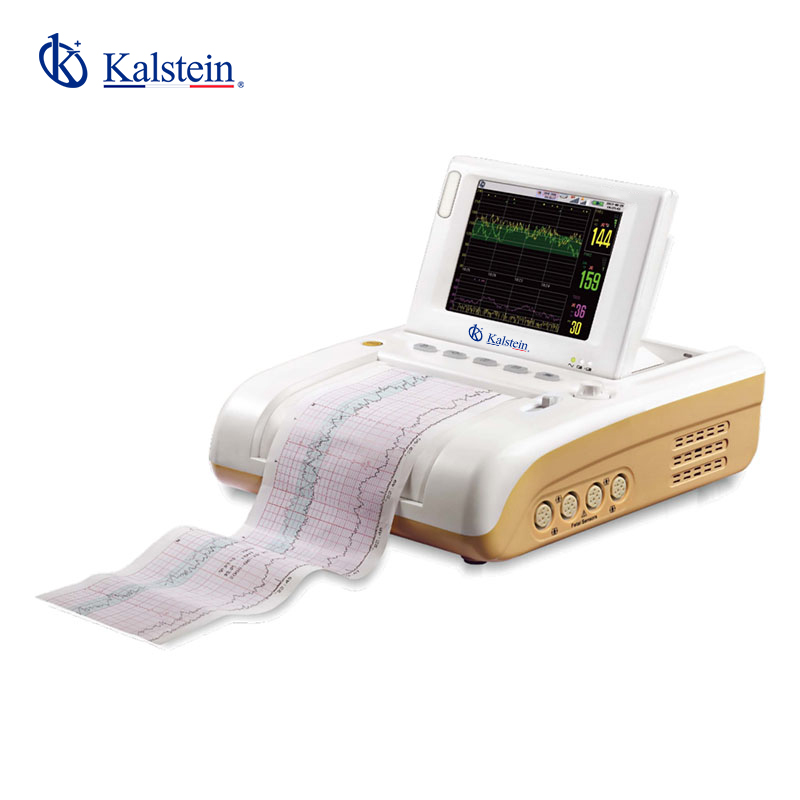
Installation and Commissioning Guide for the YR02190B Fetal Monitor
The YR02190B Fetal Monitor stands out in the healthcare industry for its advanced features, such as a vibrant 5.7-inch color display and multiple waveform tracking capabilities. This guide provides a comprehensive overview of the installation and commissioning process to ensure that users can set up the monitor effectively and achieve accurate monitoring results.
Overview of the YR02190B Fetal Monitor
The YR02190B Fetal Monitor is designed to monitor fetal heart rate (FHR), uterine contractions (TOCO), and other vital signs during pregnancy. Its advanced features include:
- Display: 5.7-inch color screen
- Resolution: 800x600
- Waveform Tracking: Up to 6 different waveforms
- Standard Configuration: FHR1, TOCO, FM, Recorder
- Optional Configuration: Fetal Stimulator, FHR2, Cart
Technical Data Table for YR02190B
| Specification | Details |
|---|---|
| Model | YR02190B |
| FHR | < 5mW/cm2 |
| Working Frequency | 1.0 MHz |
| Signal Processing | Special DSP system and modern recognition |
| Measurement Range | 50-240 bpm |
| Alarm Range | High Limit: 160, 170, 180, 190 bpm / Low Limit: 90, 100, 110, 120 bpm |
| Maximum Audio Output Power | 1.5 Watt |
Unboxing Checklist
Before starting the installation of the YR02190B Fetal Monitor, ensure that you have the following items:
- YR02190B Fetal Monitor unit
- Power adapter and cables
- User manual
- Fetal sensors (if not pre-installed)
- Calibration tools
- Mounting brackets and hardware
Installation Steps
The installation of the YR02190B involves several critical steps:
Step 1: Choose the Installation Location
Select a location that meets the environmental requirements for the monitor. Ensure that the area is clean, dry, and free from excessive electromagnetic interference (EMI). A stable surface is essential for accurate readings.
Step 2: Secure the Monitor
Use the provided mounting brackets to securely attach the YR02190B monitor to the wall or a mobile cart. Ensure that it is level and anchored to prevent any movement during operation.
Step 3: Connect the Power Supply
Plug the power adapter into the monitor and connect it to a grounded electrical outlet. Verify that the voltage and frequency specifications match those required by the monitor.
Step 4: Sensor Setup
Attach the fetal sensors as per the user manual. Ensure that all connections are secure to avoid any disruptions during monitoring.
Step 5: Initial Power-Up
Press the power button to turn on the monitor. Observe the boot-up sequence on the display and ensure that all self-test indicators pass without errors.
Step 6: Calibration
Follow the instructions in the user manual for the initial calibration process. It is crucial to validate the accuracy of the readings before commencing any monitoring activities.
Common Setup Mistakes
During installation, operators may encounter several common mistakes:
- Improper sensor placement leading to inaccurate readings.
- Failure to calibrate the monitor correctly.
- Not verifying that the power supply matches the device specifications.
- Neglecting to secure the monitor adequately, causing instability.
Frequently Asked Questions
What is the optimal placement for the YR02190B Fetal Monitor?
The optimal placement for the YR02190B is in a location that is easily accessible for healthcare staff, free from electromagnetic interference, and has a stable surface to minimize vibrations that could affect measurement accuracy.
How do I perform a calibration on the YR02190B Fetal Monitor?
Calibration involves following the specific steps outlined in the user manual. Generally, it requires you to access the calibration settings via the monitor's menu and input the necessary parameters to ensure that the readings align with standardized values.
What should I do if the monitor displays an error code during setup?
If the monitor displays an error code, consult the troubleshooting section of the user manual. Error codes usually indicate specific issues that need addressing, such as sensor connection problems or power supply issues.
Can the YR02190B be connected to a network for data transfer?
Yes, the YR02190B has options for network connection that allow for data transfer to electronic health records (EHR) systems. Follow the network setup instructions in the user manual for proper configuration.
What maintenance is required for the YR02190B Fetal Monitor?
Routine maintenance for the YR02190B includes regular cleaning of the exterior, ensuring sensors are functioning correctly, and performing periodic calibrations to maintain accuracy. Refer to the maintenance section in the user manual for detailed guidance.
How can I ensure I am using the correct fetal sensors with the YR02190B?
Using the correct sensors is crucial for optimal performance. Refer to the compatibility list provided in the user manual or consult with a Kalstein representative to confirm that your sensors are the recommended ones for the YR02190B.
If you are looking for a fusion of innovation and quality, you have come to the right place. At Kalstein, we offer you the luxury of exploring our exclusive catalog of laboratory equipment. We manufacture every device to the highest standards of excellence. Our intuitive and seamless online purchasing channels are designed for your convenience, securing the most competitive prices. Hesitate no longer — we bring science to life, it is time to become part of our community.