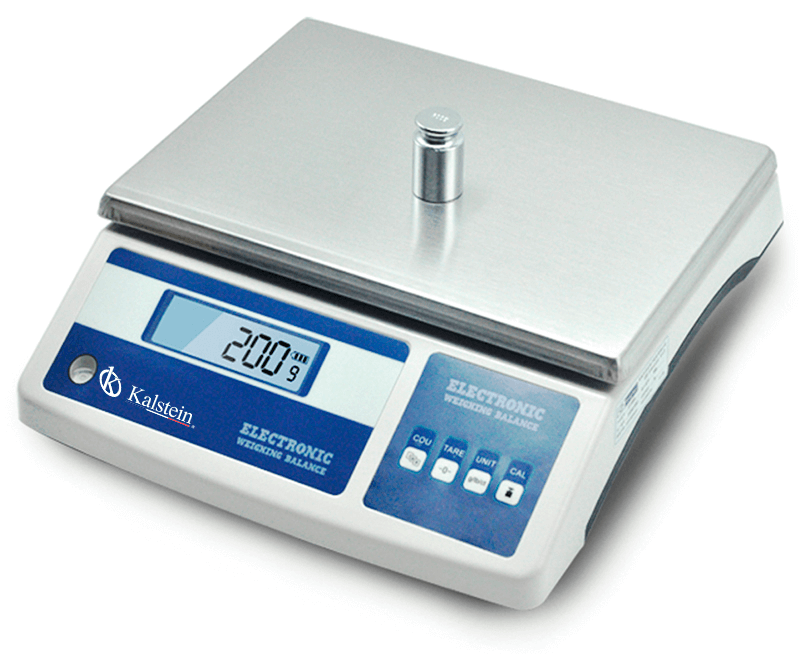
Frequent Errors and Troubleshooting by Symptoms for the YR05610 Industrial Balance
The YR05610 Industrial Balance is a versatile and accurate weighing device widely used in laboratories, manufacturing, and various industrial applications. However, like any equipment, it may encounter errors or issues that can affect its performance. This guide aims to address common troubleshooting symptoms associated with the YR05610, providing operators with practical solutions to ensure optimal functionality.
Technical Data Table for YR05610
| Model | Capacity | Readability | Repeatability | Linearity | Pan Size | Stabilization Time |
|---|---|---|---|---|---|---|
| YR05610 | 5.1 kg | 0.1 g | ±0.2 g | ±0.3 g | 315 x 230 mm | ≤2 S |
Symptom: Equipment Does Not Power On
One of the most alarming issues operators may face is when the YR05610 does not power on. This can halt operations and create confusion about the device's status. Below are common causes and solutions:
- Power Supply Issues: Ensure that the power source is functional and properly connected. Check the power cord for any visible damage.
- Fuse Problems: Verify if the internal fuse is blown and needs replacement. Consult the user manual for the fuse specifications.
- Internal Component Failure: If the above steps fail, there may be an internal component failure. Contact technical support for further diagnosis.
Symptom: Error Code E-03
Error codes are a crucial way for the YR05610 to communicate issues. Error Code E-03 usually indicates a problem with the calibration. Here’s how to troubleshoot it:
- Check Calibration: Ensure that the device has been calibrated recently. Perform calibration according to the manufacturer’s instructions.
- Weight Interference: Remove any weights from the pan before recalibrating, as residual weight can affect accuracy.
- Software Update: Check if the software version is up to date. Outdated software can lead to erroneous error codes.
Symptom: Inconsistent Readings
Inconsistent measurements can lead to significant issues in both laboratory and industrial settings. Here are probable causes and solutions:
- Environmental Factors: Vibrations, temperature fluctuations, and air currents can affect accuracy. Ensure the balance is placed on a stable, vibration-free surface.
- Dirty Pan: Residue on the weighing pan can impact measurements. Clean the pan regularly with appropriate cleaning agents.
- Calibration Needed: If inconsistent readings continue, recalibrate the balance to restore its precision.
Symptom: Overload Alarm Triggering
The overload alarm is a protective feature designed to prevent damage. Frequent triggering can be problematic. Here are some solutions:
- Check Weight Limits: Ensure that the weights being measured do not exceed the maximum capacity of 5.1 kg.
- Remove Excess Weights: If the alarm is triggered, remove all weights and inspect the device for any visible damage.
- Inspect for Mechanical Issues: Over time, mechanical components may wear out. Regular inspections and maintenance can prevent overload issues.
Symptom: Display Malfunctions
Malfunctions in the display can confuse operators and lead to incorrect readings. Here’s how to troubleshoot:
- Check Power Connection: A loose power connection might cause display issues. Ensure that all cables are securely connected.
- Screen Damage: Inspect for cracks or physical damage to the LCD screen. If damaged, consider contacting support for a replacement.
- Software Glitch: Restart the device to reset the software. If problems persist, a factory reset might be necessary.
Symptom-Solution Table
| Symptom | Probable Cause | Solution |
|---|---|---|
| Does not power on | Power supply issues | Check power cord and connections |
| Error Code E-03 | Calibration error | Recalibrate the device |
| Inconsistent readings | Environmental factors | Place on stable surface |
| Overload alarm | Exceeded weight limit | Remove weights and inspect |
| Display malfunction | Loose connections or screen damage | Check connections and inspect screen |
Frequently Asked Questions
What should I do if my YR05610 displays an error code?
If your YR05610 displays an error code, consult the user manual to identify the specific issue. Common steps include recalibrating the device or inspecting for mechanical failures. Reach out to technical support if the problem persists.
How often should I calibrate my YR05610 Industrial Balance?
Calibration frequency depends on usage; however, it is generally recommended to calibrate the YR05610 at least once a month or before any critical measurements. Frequent usage in harsh environments may require more regular calibration.
Can environmental factors affect the performance of the YR05610?
Yes, environmental conditions such as temperature, humidity, and vibrations can significantly impact the performance of the YR05610. Ensure that the balance is situated in a stable and controlled environment for accurate measurements.
What types of maintenance does the YR05610 require?
The YR05610 requires regular cleaning of the weighing pan, calibration checks, and periodic inspections of power connections and mechanical components. Proper maintenance ensures longevity and accuracy.
What should I do if I encounter consistent errors with my balance?
If you are experiencing persistent errors, first check for common issues like calibration and environmental factors. If the problem continues, it is advisable to contact technical support for comprehensive diagnostics and assistance.
Is there a warranty for the YR05610 Industrial Balance?
The YR05610 typically comes with a standard warranty covering defects in material and workmanship. The duration may vary, so it is essential to review the warranty documentation provided upon purchase.
If you are looking for a fusion of innovation and quality, you have come to the right place. At Kalstein, we offer you the luxury of exploring our exclusive catalog of laboratory equipment. We manufacture every device to the highest standards of excellence. Our intuitive and seamless online purchasing channels are designed for your convenience, securing the most competitive prices. Hesitate no longer — we bring science to life, it is time to become part of our community.