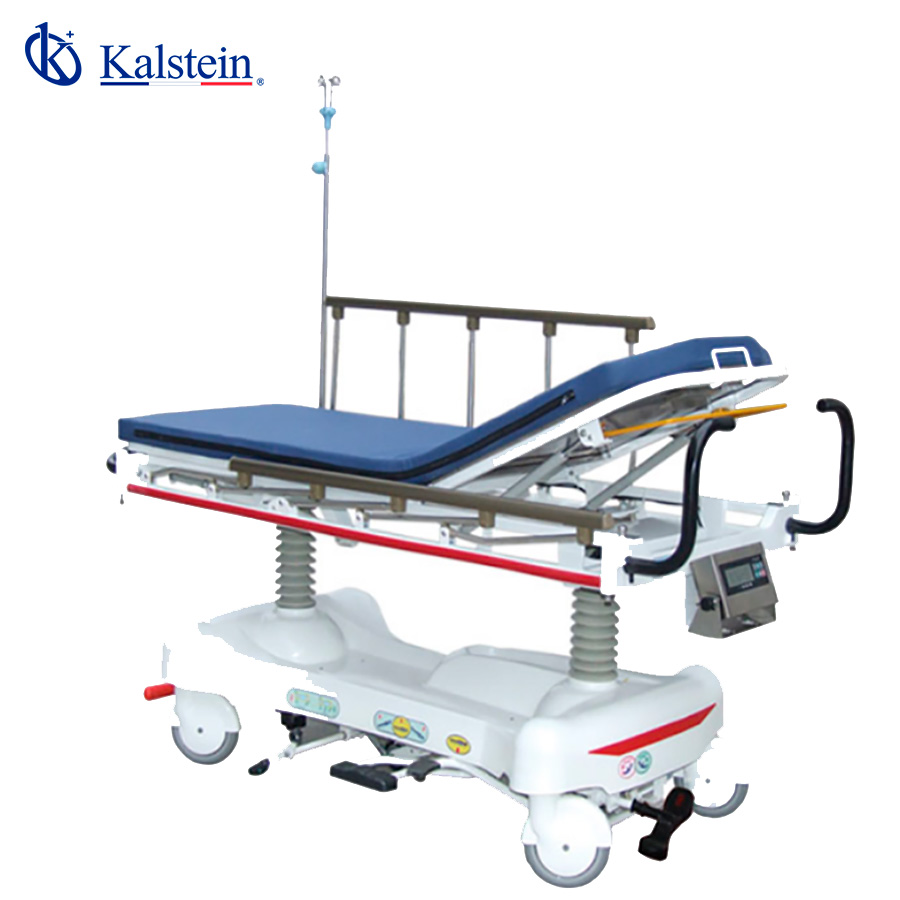
Common Errors and Troubleshooting Symptoms for the YR06292 Hydraulic Five Function Transfer Stretcher
The YR06292 Hydraulic Five Function Transfer Stretcher is an essential piece of medical equipment used for transporting patients safely and efficiently. Understanding common errors and how to troubleshoot them is critical for maintaining operational reliability and ensuring patient safety.
Technical Overview of YR06292
| Specification | Details |
|---|---|
| Model | YR06292 |
| Size (L*W*H) | 2070*730*660/940 mm |
| Maximum Loading Capacity | 150 kg |
| Weighing Accuracy | 0.02 kg to 0.05 kg |
| Backrest Max Upward Angle | 75° |
| Footrest Max Upward Angle | 45° |
| Pumps | 2 USA hydraulic |
| Height Adjustment | 630-950 mm |
| Trendelenburg Angle | 15° |
| Anti-Trendelenburg Angle | 15° |
Troubleshooting Symptoms
Below, we will address common symptoms encountered while using the YR06292 stretcher, their probable causes, and effective solutions.
1. Equipment Does Not Power On
This issue may arise from several underlying factors. It is crucial to inspect each potential cause systematically.
- Power Supply Issues: Check if the stretcher is plugged into a functional power outlet. If not, switch outlets or check the fuse.
- Damaged Power Cord: Inspect the power cord for any visible signs of wear or damage. Replace if necessary.
- Faulty Control Panel: If the power supply is fine, the problem may lie within the control panel. Inspect for damage or loose connections.
2. Error Code E-03 Appears
Error codes indicate specific malfunctions. Code E-03 typically signifies an issue with the hydraulic system.
- Hydraulic Fluid Levels: Check hydraulic fluid levels and top up as necessary to prevent system failure.
- Leakage: Inspect the hydraulic system for leaks. Repair any identified leaks promptly.
- Pump Malfunction: Verify the functionality of the hydraulic pump. Replace it if it fails to operate as expected.
3. Inconsistent Readings from Controls
Inconsistent measurements can impede patient safety and operational efficiency.
- Calibration Issues: Ensure that the stretcher is calibrated correctly. Refer to the user manual for calibration procedures.
- Environmental Interference: Excessive vibration or interference from nearby equipment may affect readings. Position the stretcher away from such sources.
- Control Panel Damage: If readings remain erratic, the control panel may be damaged and require replacement.
4. Hydraulic System Fails to Engage
Hydraulic failures may prevent the stretcher from adjusting to the desired height or position.
- Fluid Leakage: Check the hydraulic lines and connections for leaks. Address any leaks immediately.
- Clogged Filters: Inspect hydraulic filters for blockages and replace them if necessary.
- Pump Failure: Evaluate the performance of the hydraulic pump — it may need servicing or replacement.
Symptom-Cause-Solution Matrix
| Symptom | Probable Cause | Solution |
|---|---|---|
| Equipment does not power on | Power supply issues | Check outlet and replace cord |
| Error Code E-03 | Hydraulic system malfunction | Check fluid levels and pump |
| Inconsistent readings | Calibration or interference | Recalibrate and relocate stretcher |
| Hydraulic system fails to engage | Fluid leakage or pump failure | Inspect lines and replace pump |
Frequently Asked Questions
What are the common symptoms indicating that the YR06292 stretcher requires maintenance?
Common symptoms include power failures, error codes appearing on the control panel, inconsistent readings, and failures in the hydraulic system. Regular inspections and timely addressing of these issues can extend the equipment's lifespan.
How can I troubleshoot error codes displayed by the YR06292?
Troubleshooting error codes involves identifying the specific code being displayed, consulting the user manual for its meaning, and following the prescribed steps for resolution, such as checking hydraulic fluid levels or inspecting the control panel.
What safety precautions should be taken when using the YR06292 stretcher?
Always ensure the stretcher is on a level surface, check for functionality before use, and avoid overloading beyond the maximum capacity of 150 kg to ensure safe operation and prevent accidents.
How often should the YR06292 stretcher be serviced?
The stretcher should be serviced every six months or as needed, based on usage frequency and any symptoms indicating potential issues. Regular maintenance helps ensure optimal performance and safety.
Where can I find replacement parts for the YR06292?
Replacement parts for the YR06292 can be obtained through authorized suppliers or directly from the manufacturer. It is essential to use genuine parts to maintain functionality and safety.
What is the expected lifespan of the YR06292 stretcher?
The expected lifespan of the YR06292 stretcher is typically around 5-7 years with proper maintenance and care. However, this may vary based on usage intensity and environmental factors.
How do I request a quote for the YR06292 stretcher?
You can request a quote for the YR06292 stretcher by contacting our sales team or through the designated request form available on our website.
If you are looking for a fusion of innovation and quality, you have come to the right place. At Kalstein, we offer you the luxury of exploring our exclusive catalog of laboratory equipment. We manufacture every device to the highest standards of excellence. Our intuitive and seamless online purchasing channels are designed for your convenience, securing the most competitive prices. Hesitate no longer — we bring science to life, it is time to become part of our community.