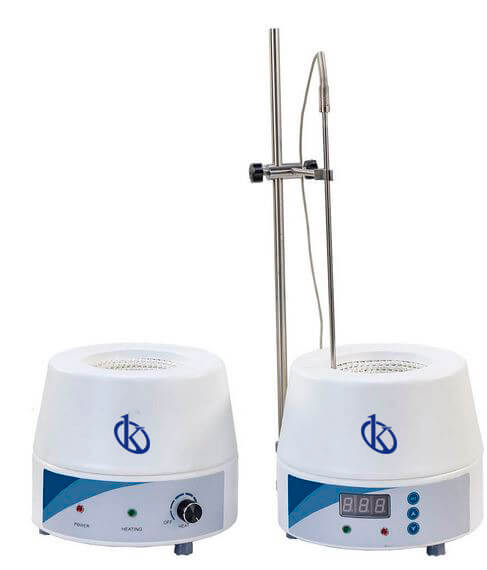
Common Errors and Troubleshooting Symptoms for the YR05036 Heating Blanket
The YR05036 Heating Blanket is widely utilized in laboratory settings for its efficient heating capabilities. Understanding common errors and troubleshooting symptoms is essential for maintaining the functionality and longevity of this equipment. This article delves into the various symptoms you might encounter while using the YR05036 and provides detailed guidance on diagnosing and resolving these issues.
Technical Data for YR05036
| Model | Brand | Category | Price USD | Price EUR | Net Weight (kg) | Gross Weight (kg) | Dimensions (mm) | Voltage (V) | Max Temperature (°C) | Power (W) |
|---|---|---|---|---|---|---|---|---|---|---|
| YR05036 | Kalstein | Heating Mantles | 70.00 | 128 | 8.5 | 9.2 | 350 x 250 | 200 – 240V / 50 – 60Hz or 100 – 120V / 50 – 60Hz | 380 | 800 |
Common Symptoms and Troubleshooting Steps
When operating the YR05036 Heating Blanket, users may encounter a range of symptoms. Below is a structured approach to identifying these symptoms, their probable causes, and actionable solutions.
Equipment Does Not Power On
This symptom can be frustrating and may occur due to several reasons. The possible causes include:
- Power supply issue
- Faulty power cord
- Internal circuit problem
Diagnostic Steps:
- Check the power source to ensure it is functioning.
- Inspect the power cord for any visible damage.
- Examine internal fuses or circuit breakers.
Solutions:
- Replace the power cord if defective.
- Reset the circuit breaker if tripped.
- Contact a technician for internal repairs.
Error Code E-03
Encountering an error code can be daunting. Error code E-03 typically indicates a temperature probe failure.
Probable Causes:
- Disconnected temperature probe
- Defective temperature sensor
- Software malfunction
Diagnostic Steps:
- Inspect the connections of the temperature probe.
- Test the functionality of the temperature sensor.
- Update or reset the software if applicable.
Solutions:
- Reconnect or replace the temperature probe.
- Replace the defective temperature sensor.
- Consult with the manufacturer for software issues.
Inconsistent Heating
Inconsistent heating can affect experimental results significantly. It may arise from various factors:
- Calibration issues
- Worn out heating elements
- Improper setup
Diagnostic Steps:
- Check the calibration of the heating blanket.
- Inspect the heating elements for signs of wear.
- Review the setup to ensure proper usage.
Solutions:
- Calibrate the unit according to the manufacturer's guidelines.
- Replace worn heating elements.
- Follow the recommended setup protocol.
Common Symptoms to Cause and Solution Table
| Symptom | Probable Cause | Solution |
|---|---|---|
| Equipment Does Not Power On | Power supply issue, faulty power cord | Check power source and replace cord if necessary |
| Error Code E-03 | Disconnected probe, defective sensor | Reconnect probe, replace sensor |
| Inconsistent Heating | Calibration issues, worn heating elements | Calibrate and replace elements |
Frequently Asked Questions
What should I do if my YR05036 Heating Blanket is not reaching the desired temperature?
If the YR05036 Heating Blanket is not reaching the desired temperature, first check the calibration settings to ensure they are correct. Inspect the heating elements for any wear or damage. If everything appears normal, consider contacting technical support for further assistance.
How can I ensure the safety of my YR05036 Heating Blanket during operation?
To ensure safety during operation, always follow the manufacturer’s guidelines for use, avoid overloading the blanket, and regularly inspect the power cord for any signs of wear or damage. Additionally, ensure the blanket is placed on a stable, heat-resistant surface.
What is the recommended maintenance schedule for the YR05036 Heating Blanket?
Regular maintenance should include checking the power cord, inspecting heating elements, and calibrating the device. A bi-annual inspection by a qualified technician is recommended to ensure optimal performance.
Are there any specific environmental conditions required for the YR05036?
The YR05036 Heating Blanket should be used in a controlled laboratory environment with stable temperature and humidity levels. Ensure that it is placed away from direct sunlight and moisture sources to prevent malfunction.
How do I interpret the error codes on my YR05036 Heating Blanket?
Error codes are typically outlined in the user manual. Each code corresponds to specific issues, such as temperature probe failures or power supply problems. Consult the manual for detailed troubleshooting steps related to each code.
What is the maximum temperature the YR05036 can achieve?
The maximum temperature that the YR05036 Heating Blanket can achieve is 380°C. It is crucial to monitor the temperature to avoid overheating, which can lead to equipment damage.
How can I request additional support for my YR05036 Heating Blanket?
For additional support, you can reach out directly to the manufacturer's customer service or technical support team. They can provide you with troubleshooting guidance, repair services, and replacement parts.
If you are looking for a fusion of innovation and quality, you have come to the right place. At Kalstein, we offer you the luxury of exploring our exclusive catalog of laboratory equipment. We manufacture every device to the highest standards of excellence. Our intuitive and seamless online purchasing channels are designed for your convenience, securing the most competitive prices. Hesitate no longer — we bring science to life, it is time to become part of our community.