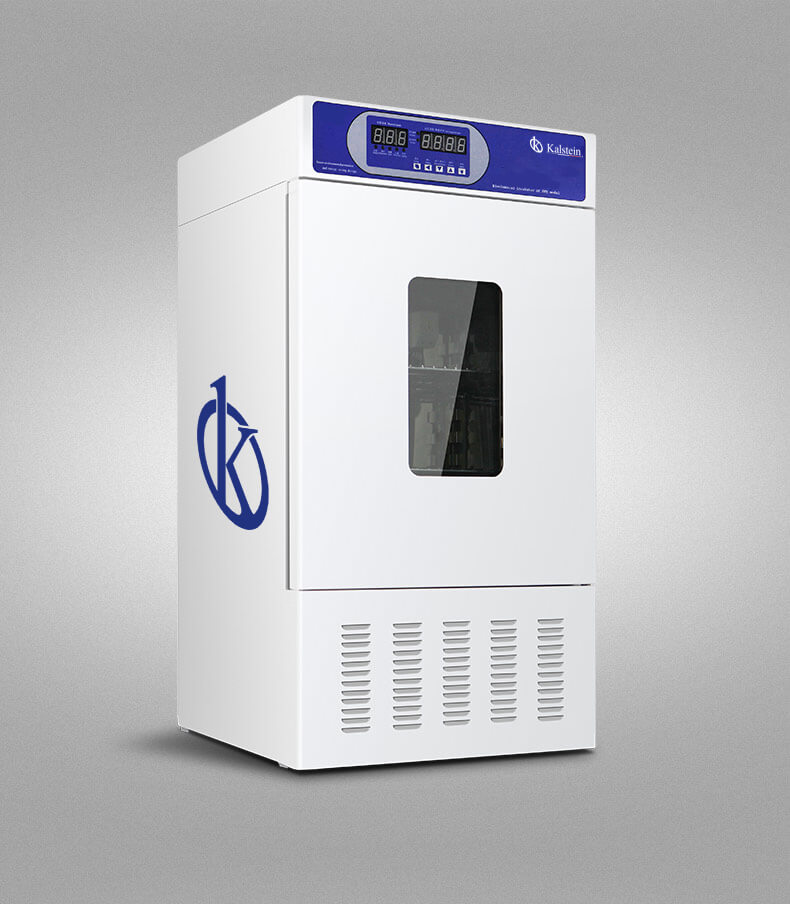
Common Errors and Troubleshooting Symptoms for the YR02037 Biochemical BOD Incubator
The YR02037 Biochemical BOD Incubator is a specialized piece of laboratory equipment designed to analyze biochemical oxygen demand in water samples. While it is built to be reliable and efficient, users may encounter various issues that can disrupt operations. This guide will delve into common errors and the symptoms associated with the YR02037, providing probable causes and effective troubleshooting steps for each symptom to ensure optimal performance.
Technical Specifications of YR02037
| Model | Temperature Range (°C) | Accuracy (°C) | Fluctuation (%) | Voltage (V) | Power (kW) | Internal Size (mm) (H * W * D) | Total Dimension (mm) (H * W * D) | Net Weight (KG) |
|---|---|---|---|---|---|---|---|---|
| YR02037 | 0 ~ 60 | ± 0.5 | ± 1 | 220 | 0.35 | 580 × 450 × 380 / 100L | 1100 × 590 × 620 | 90 |
Troubleshooting by Symptom
Equipment Does Not Power On
If the YR02037 does not power on, check the following probable causes:
- Power cord not securely plugged in.
- Blown fuse in the facility's electrical system.
- Faulty power switch.
To resolve this issue:
- Ensure the power cord is securely connected to both the incubator and the electrical outlet.
- Check the facility's electrical panel for any blown fuses or tripped breakers.
- Test the power switch for functionality and replace if necessary.
Error Code E-03
Error code E-03 typically indicates a temperature sensor failure. Follow these steps:
- Inspect the temperature sensor for physical damage.
- Ensure the sensor is properly connected to the control panel.
- Reset the incubator to see if the error persists.
If the error persists, consider replacing the temperature sensor.
Inconsistent Temperature Readings
Inconsistent temperature readings can be caused by:
- Calibration issues.
- Blocked airflow within the incubator.
- Faulty temperature control system.
Troubleshooting steps include:
- Recalibrate the incubator according to the manufacturer's guidelines.
- Ensure that air vents are unobstructed.
- Check for any faults in the temperature control system and repair or replace components as needed.
Overheating Alarm Triggering
If the overheating alarm is triggered, consider these causes:
- Faulty temperature sensor.
- Improper door seal causing heat loss.
- Excessive load inside the incubator.
To address this issue:
- Inspect the temperature sensor for damage and functionality.
- Check the door seal for integrity and replace if necessary.
- Avoid overloading the incubator beyond its specifications.
Symptom to Cause to Solution Table
| Symptom | Probable Cause | Solution |
|---|---|---|
| Equipment Does Not Power On | Power cord issue or blown fuse | Check connections and replace fuse |
| Error Code E-03 | Temperature sensor failure | Inspect and replace sensor |
| Inconsistent Temperature Readings | Calibration or airflow issues | Recalibrate and check airflow |
| Overheating Alarm Triggering | Faulty sensor or door seal | Inspect and repair as needed |
Frequently Asked Questions
What are the common symptoms of malfunctioning in the YR02037 incubator?
Common symptoms include equipment not powering on, error codes appearing on the display, inconsistent temperature readings, and alarm triggers for overheating. Each symptom has specific probable causes that can be diagnosed and resolved through proper troubleshooting steps.
How often should I calibrate the YR02037 incubator?
Calibration should be performed regularly, ideally once a month or after any significant temperature fluctuation. This ensures that the readings remain accurate and reliable.
What should I do if there is a persistent error code on the YR02037?
If a persistent error code appears, consult the troubleshooting guide specific to that error. If the issue cannot be resolved through basic troubleshooting, professional service may be required to inspect and repair the incubator.
Can the YR02037 incubator be used for applications outside of biochemical analysis?
While the YR02037 is specifically designed for biochemical oxygen demand analysis, it can be adapted for various applications in microbiological studies, plant culture, and other temperature-sensitive experiments, provided those applications fall within its operational specifications.
What is the expected lifespan of the YR02037 incubator?
The expected lifespan of the YR02037 Biochemical BOD Incubator is typically around 10 years with proper maintenance and regular servicing. Routine checks and timely repairs can extend its operational life significantly.
How do I request technical support for the YR02037 incubator?
Technical support can be requested by contacting the customer service department directly. Ensure to have the model number and any relevant information about the issue ready for efficient assistance.
For more in-depth support and to explore our range of laboratory equipment, feel free to request a quote on Kalstein Plus.
If you are looking for a fusion of innovation and quality, you have come to the right place. At Kalstein, we offer you the luxury of exploring our exclusive catalog of laboratory equipment. We manufacture every device to the highest standards of excellence. Our intuitive and seamless online purchasing channels are designed for your convenience, securing the most competitive prices. Hesitate no longer — we bring science to life, it is time to become part of our community.