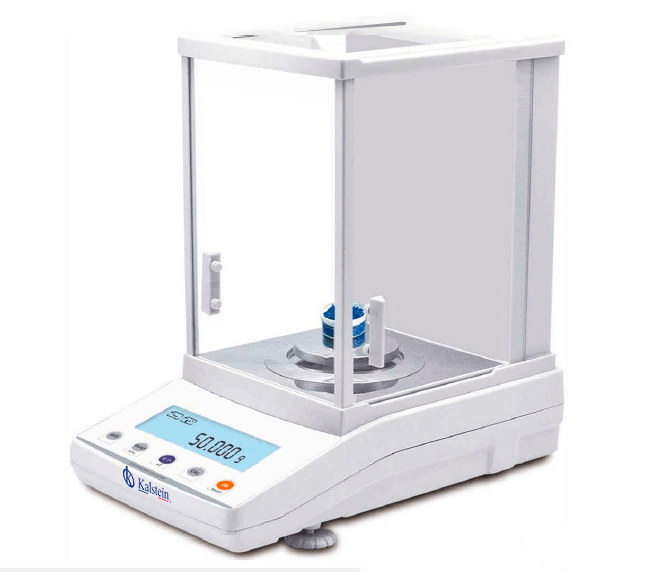
Common Errors and Troubleshooting Symptoms for the YR05775 Analytical Balance
The YR05775 analytical balance is a sophisticated instrument crucial for precision measurements in various laboratory settings. However, like all equipment, it may encounter issues that can disrupt its operation. Understanding common errors and their corresponding troubleshooting steps is vital for maintaining optimal performance and ensuring accurate results.
Technical Specifications of the YR05775
| Model | Brand | Category | Subcategory | Price USD | Price EUR | Net Weight | Gross Weight | Dimensions | Packaging |
|---|---|---|---|---|---|---|---|---|---|
| YR05775 | Kalstein | Balances | Analytical Balance | 270.00 | 582 | 10 | 11 | x x | 48 x 32 x 49 |
Symptoms and Troubleshooting Steps
Below are common symptoms that users of the YR05775 analytical balance may experience, alongside potential causes and solutions to rectify the issues.
1. Equipment Does Not Power On
If the YR05775 does not power on, check the following:
- Power Supply: Ensure that the balance is properly plugged in and that the outlet is functioning. Try using a different power outlet if necessary.
- Power Cable: Inspect the power cable for any visible damage or wear. Replace the cable if it appears compromised.
- Internal Fuses: Check for blown fuses within the unit. Refer to the user manual for instructions on how to access and replace internal fuses.
2. Error Code E-03 Appears
The appearance of error code E-03 indicates a malfunction in the internal electronics. Steps to troubleshoot include:
- Reset the Unit: Power off the balance for a few minutes and then turn it back on.
- Calibration Check: Perform a calibration check as per the user manual. An improper calibration may cause electronic errors.
- Technical Support: If the error persists, contact technical support for further diagnostic assistance.
3. Inconsistent Readings
Inconsistent readings can lead to unreliable data. To troubleshoot:
- Check Leveling: Ensure that the balance is placed on a stable and level surface. Use the built-in leveling bubble to adjust as necessary.
- Draft Shield Usage: Make sure that the draft shield is properly closed during measurements to avoid air currents affecting results.
- Temperature and Humidity: Verify that the environment meets the recommended temperature and humidity levels. Rapid changes can impact accuracy.
4. Overload Indicator Triggered
If the overload indicator is triggered, this typically means the maximum weighing capacity of the balance has been exceeded. Address this by:
- Remove Excess Weight: Safely remove the item causing the overload and ensure that weights do not exceed 200 grams for the YR05775.
- Inspect for Damage: Check for any visible damage to the balance due to overload; if damaged, discontinue use and contact support.
5. Error Code E-05: Sensor Failure
Error code E-05 usually indicates a sensor failure. To troubleshoot:
- Check Sensor Connections: Inspect the connections leading to the weighing sensor for any disconnections or loose wiring.
- Environmental Conditions: Ensure that the balance is not exposed to extreme temperatures or humidity, which can affect sensor performance.
Symptom-Cause-Solution Table
| Symptom | Possible Cause | Recommended Solution |
|---|---|---|
| Equipment Does Not Power On | Power supply issues or faulty cable | Check power source and replace cable if necessary |
| Error Code E-03 | Internal electronics malfunction | Reset unit and perform calibration |
| Inconsistent Readings | Improper leveling or environmental factors | Level the balance and control the environment |
| Overload Indicator Triggered | Exceeded maximum weight capacity | Remove excess weight immediately |
| Error Code E-05 | Sensor failure or disconnect | Inspect connections and environmental conditions |
Frequently Asked Questions
What is the maximum capacity of the YR05775 analytical balance?
The maximum capacity of the YR05775 analytical balance is 200 grams, ensuring precise measurements within this range.
How do I perform internal calibration on the YR05775?
To perform internal calibration, access the calibration function through the menu, follow the prompts, and use the built-in calibration weights as specified in the user manual.
What should I do if the display shows an error message?
Refer to the troubleshooting section of the user manual for the specific error message. Follow the recommended steps to resolve the issue or contact technical support for further assistance.
Can I use the YR05775 in a laboratory with high humidity?
While the YR05775 is designed to operate within specific temperature and humidity ranges, it is advisable to maintain stable conditions to ensure optimal performance and accuracy.
What accessories are available for the YR05775 balance?
The YR05775 can be equipped with various optional accessories, including printers and additional calibration weights, which enhance its functionality and user experience.
How can I obtain replacement parts for the YR05775?
Replacement parts can typically be ordered through the manufacturer or authorized distributors. Ensure you have the model number and specific part required for accurate ordering.
If you are looking for a fusion of innovation and quality, you have come to the right place. At Kalstein, we offer you the luxury of exploring our exclusive catalog of laboratory equipment. We manufacture every device to the highest standards of excellence. Our intuitive and seamless online purchasing channels are designed for your convenience, securing the most competitive prices. Hesitate no longer — we bring science to life, it is time to become part of our community.