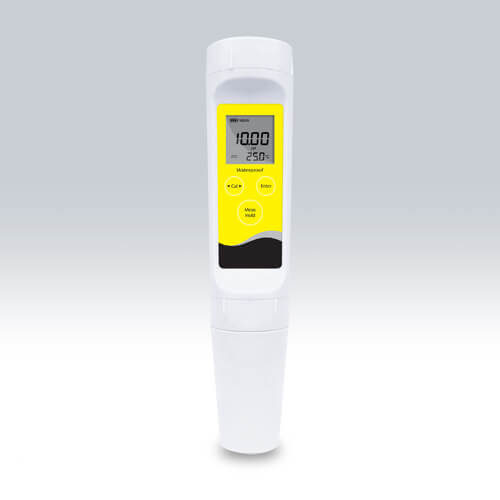
Common Errors and Troubleshooting Symptoms for the YR01815 Pocket Salinity Meter
The YR01815 Pocket Salinity Meter is a reliable tool designed for accurate salinity measurements in various environments, including laboratories, food processing, and aquatic monitoring. However, like any sophisticated instrument, it can encounter issues that may affect its performance. This article delves into common errors associated with the YR01815 and offers practical troubleshooting solutions to ensure optimal functionality.
Understanding the YR01815 Salinity Meter
The YR01815 is designed to measure salinity with precision, offering a range of features that enhance its usability. It has a low-range salinity measurement capability, with an accuracy of ±1% full scale (FS). The device supports calibration from one to three points, allowing for fine-tuning based on the specific requirements of the measurement environment. Its automatic temperature compensation also ensures that readings remain accurate across a broad temperature range.
Technical Specifications of the YR01815
| Specification | Details |
|---|---|
| Model | YR01815 |
| Salinity Range | 0.00 to 10.00 ppt |
| Resolution | 0.01 ppt |
| Accuracy | ±1% FS |
| Temperature Range | 0 to 60°C / 32 to 140°F |
| Calibration Points | 1 to 3 points |
| Power Source | 2 AAA batteries |
| Battery Life | Approximately 200 hours of continuous use |
| Dimensions | 185(L) × 40(Dia.) mm |
| Weight | 100 g |
Troubleshooting Common Symptoms
When using the YR01815, users may encounter various symptoms that can affect its operation. Understanding these symptoms, their probable causes, and how to address them is critical for maintaining the device's functionality.
1. Device Does Not Power On
One of the first signs of an issue is when the device fails to power on. This can be frustrating, but several factors could be at play:
- Battery Issues: Check if the batteries are correctly installed and not depleted. Replace them if necessary.
- Internal Circuit Failure: If battery replacement does not resolve the issue, there may be a fault in the internal circuitry.
2. Inconsistent Readings
Another common problem users may face is inconsistent or fluctuating readings. This can be due to:
- Calibration Errors: Ensure that the meter is properly calibrated. Recalibrate according to the manufacturer's instructions.
- Electrode Contamination: Check if the conductivity cell is clean and free of debris that could interfere with readings.
3. Error Code E-03
Error codes can be alarming, but they often indicate specific issues. E-03 typically relates to:
- Overload Condition: The salinity measurement exceeds the meter's range. Dilute the sample if necessary.
- Faulty Connections: Inspect the electrode connections for any loose or damaged components.
4. Automatic Shutdown Not Engaging
The automatic shutdown feature is designed to preserve battery life, but if it doesn't activate, consider these factors:
- Setting Configuration: Check the device settings to ensure that the automatic shutdown feature is enabled.
- Battery Depletion: If the battery is low, the shutdown feature may not function correctly.
5. Reading Stays at Zero
If the salinity meter displays zero regardless of the sample, it may indicate:
- Improper Calibration: The meter may need recalibration.
- Electrode Issues: The electrode might be damaged or dried out, requiring replacement.
Symptom-Cause-Solution Matrix
| Symptom | Possible Cause | Solution |
|---|---|---|
| Device does not power on | Dead batteries | Replace with new batteries |
| Inconsistent readings | Calibration errors | Recalibrate the meter |
| Error code E-03 | Overload condition | Dilute the sample |
| Automatic shutdown not engaging | Settings misconfigured | Check and enable shutdown settings |
| Reading stays at zero | Electrode issues | Inspect and replace electrode if necessary |
Frequently Asked Questions
What should I do if the YR01815 displays an error message?
If your YR01815 displays an error message, refer to the troubleshooting guide in the manual. Each error code corresponds to specific issues, and following the suggested steps can help resolve the problem effectively.
How often should I calibrate the YR01815?
The YR01815 should be calibrated regularly based on usage frequency. It is advisable to calibrate before taking critical measurements or at least every month for regular use to ensure accuracy.
Can the YR01815 be used in both freshwater and saltwater?
Yes, the YR01815 is designed for use in both freshwater and saltwater environments, making it versatile for various applications. Ensure proper calibration for different salinity levels.
What type of maintenance does the YR01815 require?
Regular maintenance for the YR01815 includes cleaning the electrode after use, checking battery levels, and ensuring the calibration solutions are fresh and not expired.
Is it possible to replace the electrode of the YR01815?
Yes, the YR01815 features a replaceable electrode module, which can significantly reduce maintenance costs and prolong the lifespan of the device.
How can I improve the accuracy of my readings?
To enhance accuracy, ensure the YR01815 is properly calibrated, clean the electrode regularly, and use fresh calibration solutions that match the salinity levels you are measuring.
Conclusion
Troubleshooting common errors on the YR01815 Pocket Salinity Meter is crucial for maintaining its accuracy and reliability. By understanding the symptoms and applying the appropriate solutions, users can ensure consistent performance. Remember always to follow the manufacturer's guidelines for calibration and maintenance.
If you are looking for a fusion of innovation and quality, you have come to the right place. At Kalstein, we offer you the luxury of exploring our exclusive catalog of laboratory equipment. We manufacture every device to the highest standards of excellence. Our intuitive and seamless online purchasing channels are designed for your convenience, securing the most competitive prices. Hesitate no longer — we bring science to life, it is time to become part of our community.